Device Info screen
Temperature Monitor
Real-time temperature monitoring with a historical graph, statistical summary, unit toggle, and peer device temperature comparison.
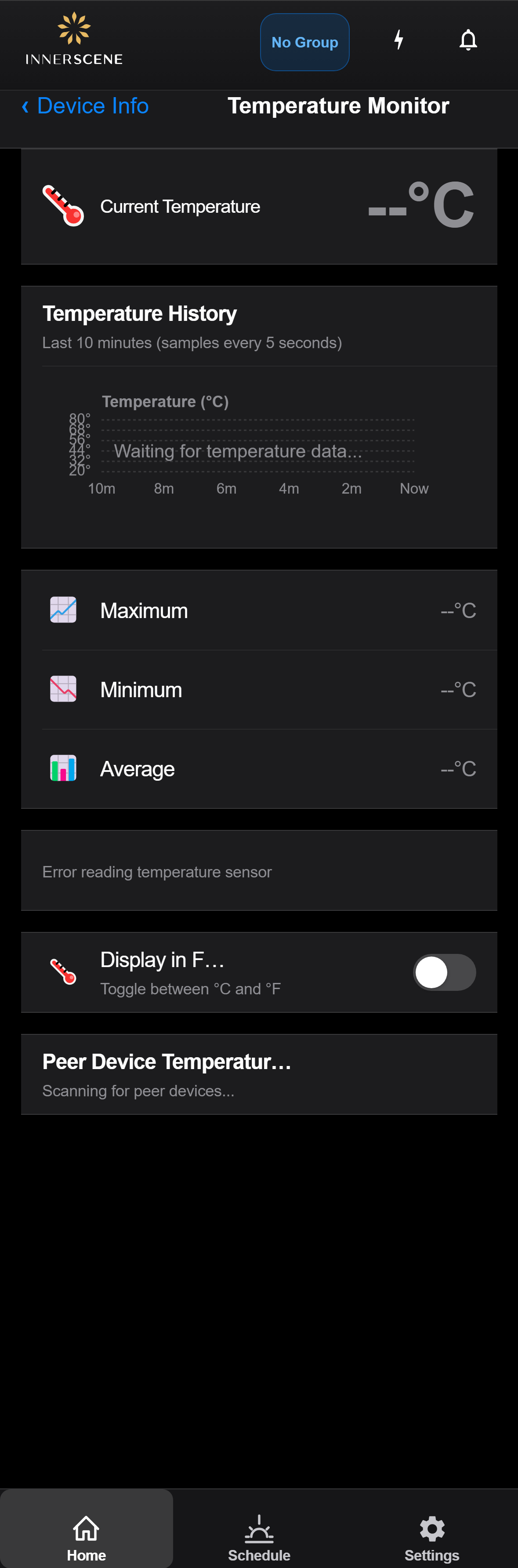
Controls on this screen
- Current Temperature
The current internal temperature of the device, displayed in large text. Updates every 5 seconds while this screen is open. Normal operating range is typically 30-60°C depending on brightness and ambient conditions.
- Temperature History Graph
A rolling chart showing temperature readings over the last 10 minutes. Samples are taken every 5 seconds. The Y-axis auto-scales to the data range. Useful for monitoring thermal stability and identifying overheating trends.
- Maximum Temperature
The highest temperature recorded since monitoring began on this screen. Resets each time you navigate away and return.
- Minimum Temperature
The lowest temperature recorded since monitoring began on this screen. Resets each time you navigate away and return.
- Average Temperature
The average of all temperature readings collected since monitoring began on this screen. Provides a good indicator of the device's typical operating temperature.
- Fahrenheit Toggle
Switches the display between Celsius (°C) and Fahrenheit (°F). Affects all temperature values on this screen including the graph, statistics, and peer device temperatures.
- Fahrenheit (°F) All temperature values on this screen are displayed in degrees Fahrenheit. Conversion is applied to the current reading, graph axis, statistics, and peer device temperatures.
- Celsius (°C) All temperature values are displayed in degrees Celsius (the default). This is the native unit reported by the device's temperature sensor.
- Peer Device Temperatures
Shows the temperature of other Innerscene fixtures in the same wireless group. Each peer device is shown as a card with its name, current temperature, and last update time. Also displays group-wide min, max, and spread statistics when multiple peers are connected.
Open this screen in the interactive guide to explore it with clickable callouts, search, and a live simulator, or browse all screens.