Schedule screen
Schedule Days
Select which days of the week the automated schedule is active. On inactive days, the fixture remains at its last known state.
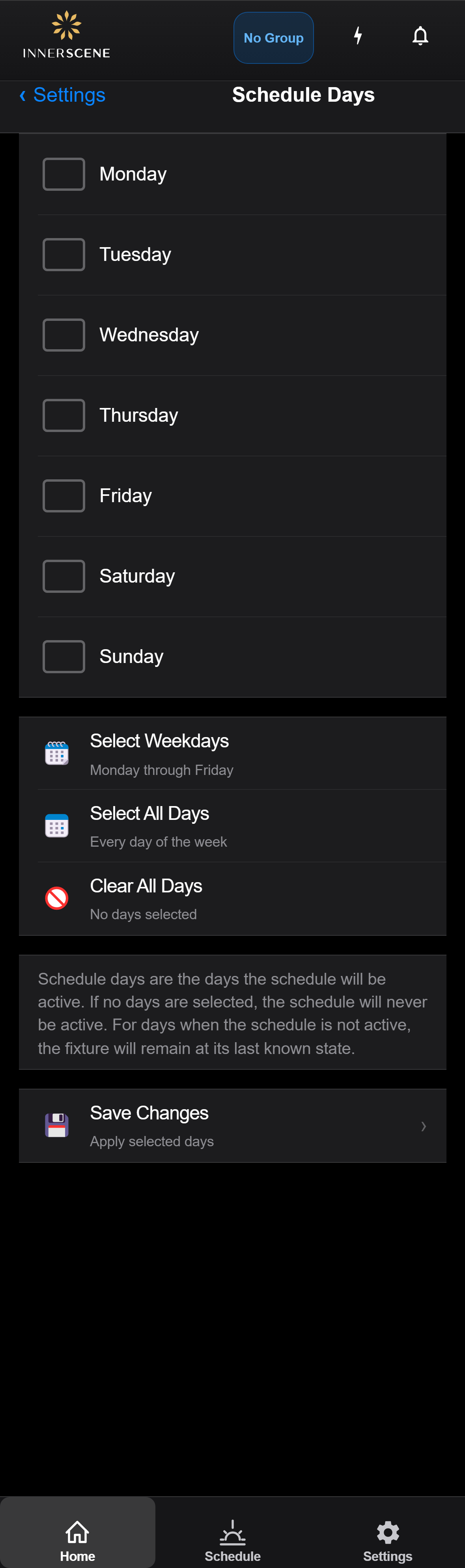
Controls on this screen
- Monday
Toggle whether the automated schedule is active on Mondays.
- Tuesday
Toggle whether the automated schedule is active on Tuesdays.
- Wednesday
Toggle whether the automated schedule is active on Wednesdays.
- Thursday
Toggle whether the automated schedule is active on Thursdays.
- Friday
Toggle whether the automated schedule is active on Fridays.
- Saturday
Toggle whether the automated schedule is active on Saturdays.
- Sunday
Toggle whether the automated schedule is active on Sundays.
- Select Weekdays
Quick-select Monday through Friday. Useful for office or commercial installations where the schedule should only run on business days.
- Select All Days
Selects all seven days. The schedule will run every day of the week. This is the most common setting for residential and 24/7 spaces.
- Clear All Days
Deselects all days. The schedule will not run on any day, effectively disabling it. The fixture will stay at whatever state it was last set to.
- Save Changes
Saves the day selection to the device. Changes take effect immediately — the schedule will only activate on the selected days going forward.
Open this screen in the interactive guide to explore it with clickable callouts, search, and a live simulator, or browse all screens.