Advanced screen
Hardware Control & Testing
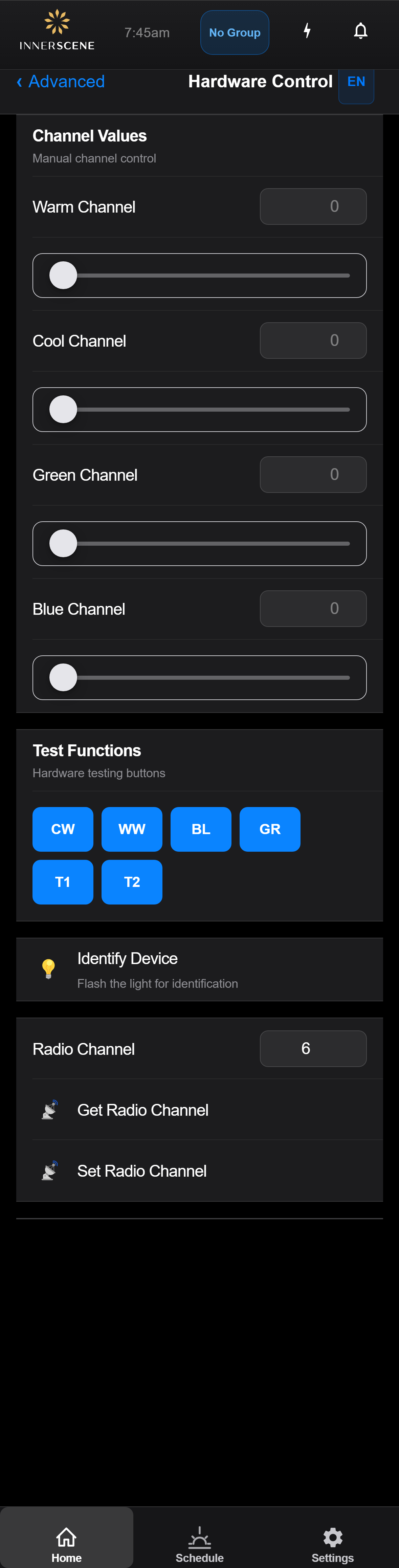
Low-level hardware controls for directly setting individual LED channel values, changing the radio channel, and running hardware test functions. Intended for installers and advanced troubleshooting.
Controls on this screen
- Radio Channel
The wireless radio channel (1-11) used for fixture-to-fixture communication in wireless sync groups. All fixtures in a group must be on the same channel.
- Get Radio Channel
Reads the current radio channel from the device and displays it in the input field.
- Set Radio Channel
Writes the entered channel number to the device. Warning: changing the channel will temporarily disconnect the fixture from its wireless group until other group members are updated to match.
- Warm Channel (W)
Direct PWM value (0-2047) for the warm white LED channel. Higher values produce more warm light output. Setting this manually overrides the normal CCT/brightness control.
- Cool Channel (C)
Direct PWM value (0-2047) for the cool white LED channel.
- Green Channel (G)
Direct PWM value (0-2047) for the green LED channel. Used for fine color rendering adjustment.
- Blue Channel (B)
Direct PWM value (0-2047) for the blue LED channel. Used for high CCT sky-light simulation.
- Identify Device
Flashes the physical light fixture rapidly to help identify which device you are controlling. Useful when multiple fixtures are installed in the same area.
Open this screen in the interactive guide to explore it with clickable callouts, search, and a live simulator, or browse all screens.