Settings screen
SkySync
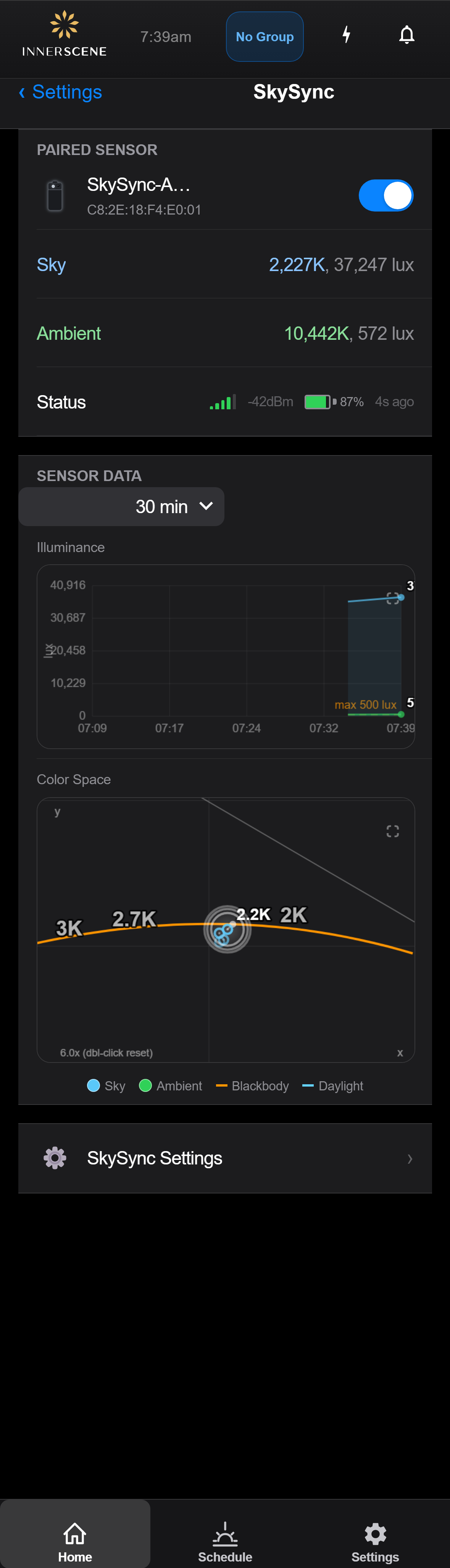
Monitor and manage the SkySync ambient light sensor. When paired, the fixture automatically tracks outdoor sky color and brightness to match indoor lighting to natural conditions.
Controls on this screen
- Enable/Disable SkySync
Master toggle to enable or disable SkySync control. When enabled, the fixture continuously reads the paired sensor and adjusts its color temperature and/or brightness to match outdoor conditions. When disabled, the fixture ignores the sensor and uses manual or schedule control.
- Enabled SkySync actively reads the paired sensor and adjusts the fixture's color temperature and/or brightness to match outdoor sky conditions in real time.
- Disabled The paired sensor is ignored. The fixture operates in manual or schedule mode. The sensor remains paired but inactive.
- Sky Sensor Reading
Live color temperature and lux reading from the sky-facing (narrow angle) sensor. This sensor is aimed at the sky through a window and reads the color of natural daylight above the horizon.
- Ambient Sensor Reading
Live color temperature and lux reading from the ambient (wide angle) sensor. This sensor reads the general ambient light level in the room or area near the window.
- Chart Time Window
Sets the time span shown in the Illuminance and Color Space charts below, from 5 minutes up to 24 hours, or "All" to show every sample collected during this session. A shorter window shows recent detail; a longer window shows the trend across the day.
- CIE Color Space Chart
A CIE 1931 chromaticity diagram plotting the color coordinates of recent sensor readings. Green dots represent sky sensor samples, blue dots represent ambient sensor samples. The orange curve is the Planckian (blackbody) locus and the cyan curve is the CIE daylight locus. Points closer to the blackbody curve indicate light with a more natural color rendering.
- SkySync Settings
Opens the [[skysync_settings|SkySync Settings]] page where you can set the control mode (CCT & Brightness, CCT Only, or Brightness Only), choose which sensor to use, set lux and CCT limits, and configure night mode behavior.
- Unpair Sensor
Removes the paired SkySync sensor from this fixture. After unpairing, the fixture returns to manual or schedule control and will no longer respond to the sensor.
- Available Sensors
Lists SkySync sensors detected nearby via Bluetooth. Sensors are identified by name and signal strength. Tap a sensor to pair it with this fixture. Only one sensor can be paired at a time.
Open this screen in the interactive guide to explore it with clickable callouts, search, and a live simulator, or browse all screens.