Settings screen
Export Settings
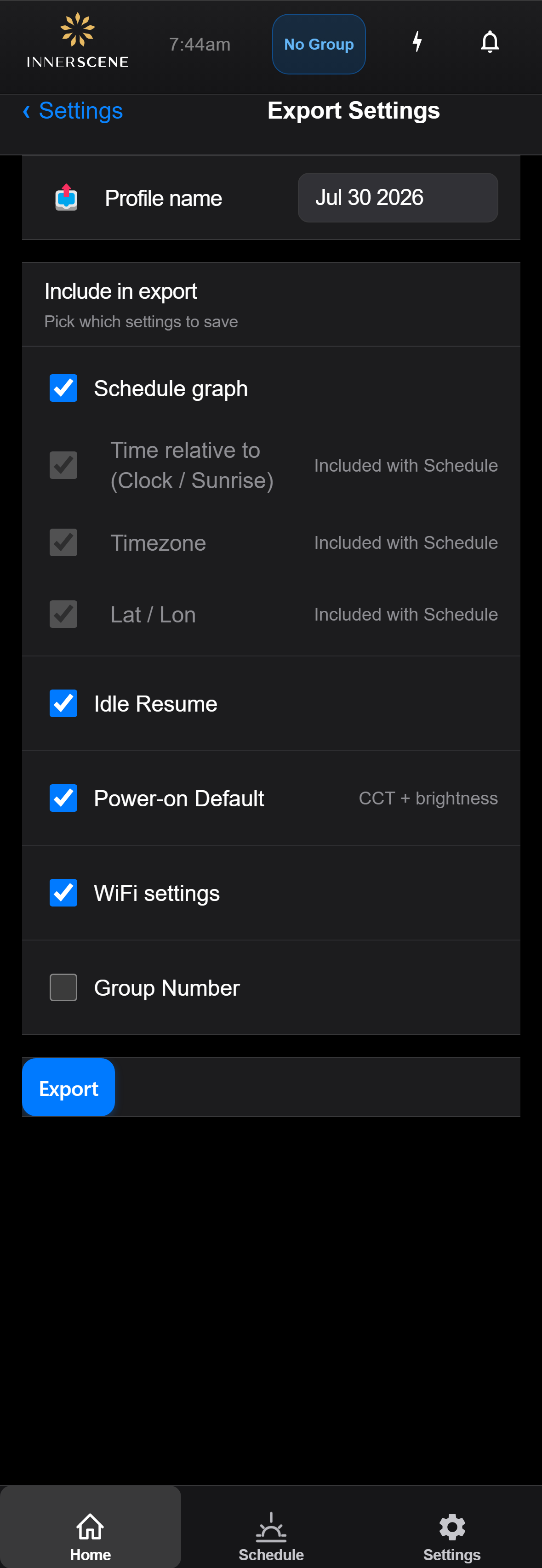
Save a named profile of this fixture's settings to a file so they can be copied to another fixture or kept as a backup. Choose exactly which settings to include before exporting.
Overview
Export Settings saves a named profile of this fixture's configuration to a file. The profile can then be applied to another fixture from the Import Settings screen, or kept as a backup. Give the profile a recognizable name, then choose exactly which settings to include.
The schedule is the central item: selecting Schedule automatically includes and locks Clock Type, Timezone, and Lat/Lon, because the schedule's timing depends on them. The remaining items (Idle Resume, Power-on Default, WiFi settings, Group Number) are independent toggles you can include or leave out.
Including WiFi settings copies the network name and password into the file. Because the password is stored in plaintext, a warning is shown before the file is downloaded so you can keep it somewhere safe. Tap Export to build the profile, then Download .json to save it.
Controls on this screen
- Profile Name
Name for this settings profile. Pre-filled with a default based on the fixture and date. The name appears in the saved profiles list when importing later, so use something that identifies the room or fixture.
- Schedule
Includes the full circadian schedule (the day-long CCT and brightness curve). Selecting Schedule automatically includes and locks Clock Type, Timezone, and Lat/Lon below, since the schedule depends on them.
- Clock Type
Whether schedule times are relative to a fixed clock or to local sunrise/sunset. Included automatically with Schedule.
- Timezone
The fixture timezone. Included automatically with Schedule so the imported schedule lands at the correct local times.
- Lat / Lon
The fixture geographic location, used to compute local sunrise and sunset. Included automatically with Schedule.
- Idle Resume
Includes the idle-resume behaviour: how the fixture returns to following the schedule after a manual override.
- Power-on Default
Includes the CCT and brightness the fixture starts at when first powered on.
- WiFi Settings
Includes the WiFi network name and password so the imported fixture can join the same network. Shows "No WiFi configured" when the fixture has no saved network. Exporting WiFi triggers a plaintext-password warning before download.
- Group Number
Includes the wireless sync group number, so an imported fixture joins the same group.
- Export
Builds the settings profile from the selected items and saves it. Once complete a confirmation appears with a Download .json button.
Open this screen in the interactive guide to explore it with clickable callouts, search, and a live simulator, or browse all screens.