External Inputs screen
DMX Configuration
Configure DMX512 digital lighting control for primary fixtures with a DMX daughter board.
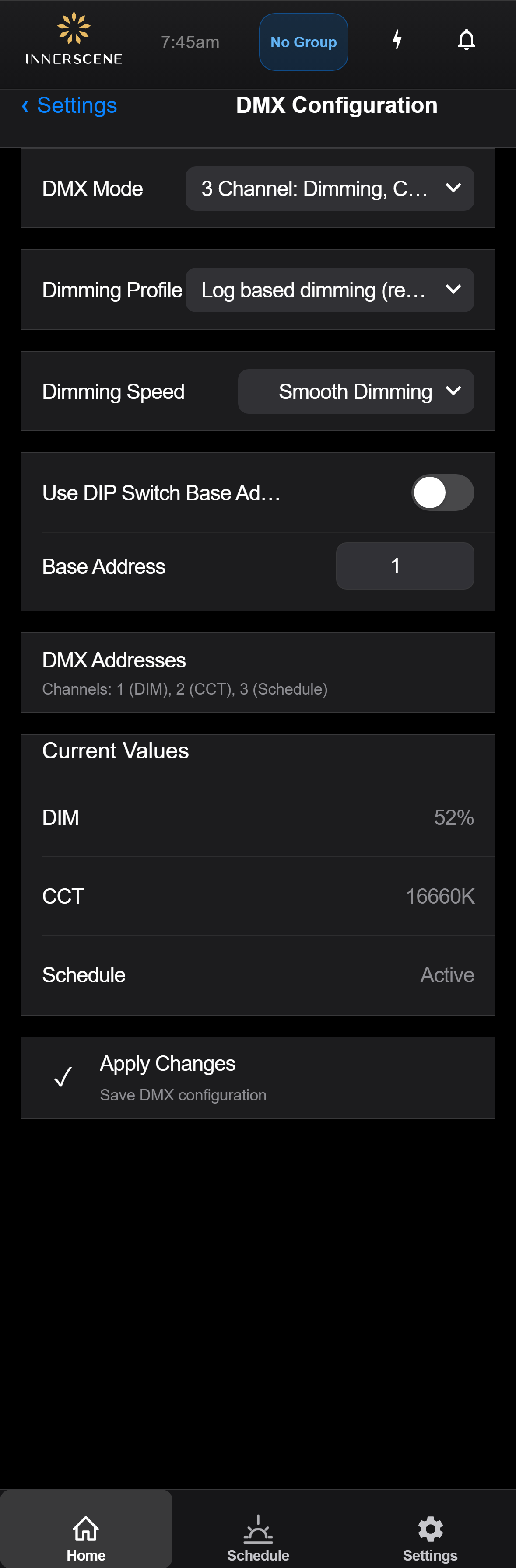
Controls on this screen
- DMX Mode
Selects how many DMX channels are used and what each channel controls. Options range from 3-channel mode (brightness, CCT, and schedule override) to single-channel dim-to-warm.
- 3 Channel: Dimming, CCT, Schedule (default) Uses three consecutive DMX channels. Channel 1 controls brightness (0-255 = 0-100%). Channel 2 controls color temperature (0-255 maps across the fixture's CCT range). Channel 3 controls schedule override (0 = follow automated schedule, 255 = full manual control, intermediate values blend between schedule and manual).
- 2 Channel: Dimming, CCT Uses two consecutive DMX channels. Channel 1 controls brightness. Channel 2 controls color temperature. The automated schedule is bypassed — the fixture is always in manual mode controlled entirely by DMX input.
- 2 Channel: Dim to Warm, Schedule Uses two consecutive DMX channels. Channel 1 controls brightness with automatic dim-to-warm behavior — as brightness decreases, color temperature shifts warmer, mimicking incandescent dimming. Channel 2 controls schedule override.
- 1 Channel: Dim to Warm Uses a single DMX channel for brightness with automatic dim-to-warm. As the DMX value decreases from 255, brightness drops and color temperature shifts progressively warmer. Simplest configuration for basic single-channel DMX dimmers.
- Dimming Profile
Controls the mathematical curve used to translate DMX values (0-255) into brightness output. Logarithmic dimming matches human perception for smooth visual transitions.
- Log Based Dimming (Recommended) (default) Applies a logarithmic curve to the DMX input so that brightness changes appear perceptually even across the 0-255 range. Low DMX values produce very subtle brightness changes, while high values produce larger visible steps. This matches how the human eye perceives brightness and results in the smoothest-looking dimming.
- Linear Dimming Maps DMX values directly to brightness output without any curve correction. DMX 128 = 50% brightness. This provides a mathematically linear response but may appear to jump in brightness at low levels. Use when the DMX controller already applies its own dimming curve.
- Dimming Speed
Controls whether brightness changes happen instantly or fade smoothly over a short duration. Smooth dimming prevents jarring jumps when DMX values change rapidly.
- Smooth Dimming (default) Brightness and CCT changes fade smoothly over a short duration (approximately 300ms) rather than jumping instantly. This prevents visible flicker or jarring transitions when DMX values change rapidly. Recommended for most installations.
- Instant Change Brightness and CCT respond immediately to DMX value changes with no fade transition. Use this for effects lighting, strobing, or when the DMX controller handles its own fading and smooth transitions are not desired.
- Use DIP Switch Address
When enabled, the DMX base address is read from the physical DIP switches on the daughter board. When disabled, the base address is set manually in software.
- Enabled The DMX base address is read from the physical DIP switches on the daughter board hardware. This allows installers to set addresses without needing software access — just flip the switches on the board.
- Disabled (default) The DMX base address is set in software using the Base Address field below. This is more convenient when configuring remotely or when the physical board is not easily accessible.
- Base Address
The starting DMX channel address (1-512) for this fixture. The fixture will occupy consecutive channels starting from this address, based on the selected mode.
- DMX Addresses
Displays the actual DMX channel numbers assigned to this fixture based on the base address and mode. Shows which channel controls DIM, CCT, and Schedule.
- Current DIM Value
Live reading of the DMX value currently being received on the brightness (DIM) channel. Range: 0-255.
- Current CCT Value
Live reading of the DMX value currently being received on the color temperature (CCT) channel. Range: 0-255.
- Current Schedule Value
Live reading of the DMX value on the schedule override channel. 0 = follow schedule, 255 = full manual control. Only active in 3-channel mode.
- Apply Changes
Saves the current DMX configuration to the device. Changes take effect immediately after applying.
DMX Value to Light Output
Each function occupies one 8-bit DMX channel (values 0 to 255) starting at the fixture's base address. In the default 3-channel personality, channel 1 is brightness, channel 2 is color temperature, and channel 3 selects schedule control. Brightness uses a gamma 2.2 curve by default (a linear profile is available on this screen); color temperature steps through the same perceptually even color scale as the other control inputs.
| DMX value | Brightness (gamma 2.2) | Brightness (linear) | CCT output |
|---|---|---|---|
| 0 | Off | Off | 2,200 K |
| 32 | 1% | 13% | ~3,000 K |
| 64 | 5% | 25% | ~3,700 K |
| 96 | 12% | 38% | ~4,600 K |
| 128 | 22% | 50% | ~5,800 K |
| 160 | 36% | 63% | ~7,600 K |
| 192 | 54% | 75% | ~11,000 K |
| 224 | 75% | 88% | ~20,400 K |
| 255 | 100% | 100% | 200,000 K |
- Schedule channel: values 0 to 127 leave the fixture under DMX control; 128 to 255 hand control to the built-in circadian schedule.
- In the dim-to-warm personalities a single channel drives both columns at once: the same value sets brightness on the gamma curve and color on the CCT scale.
- If the DMX signal stops, the fixture holds its last received values.
Open this screen in the interactive guide to explore it with clickable callouts, search, and a live simulator, or browse all screens.