External Inputs screen
DALI
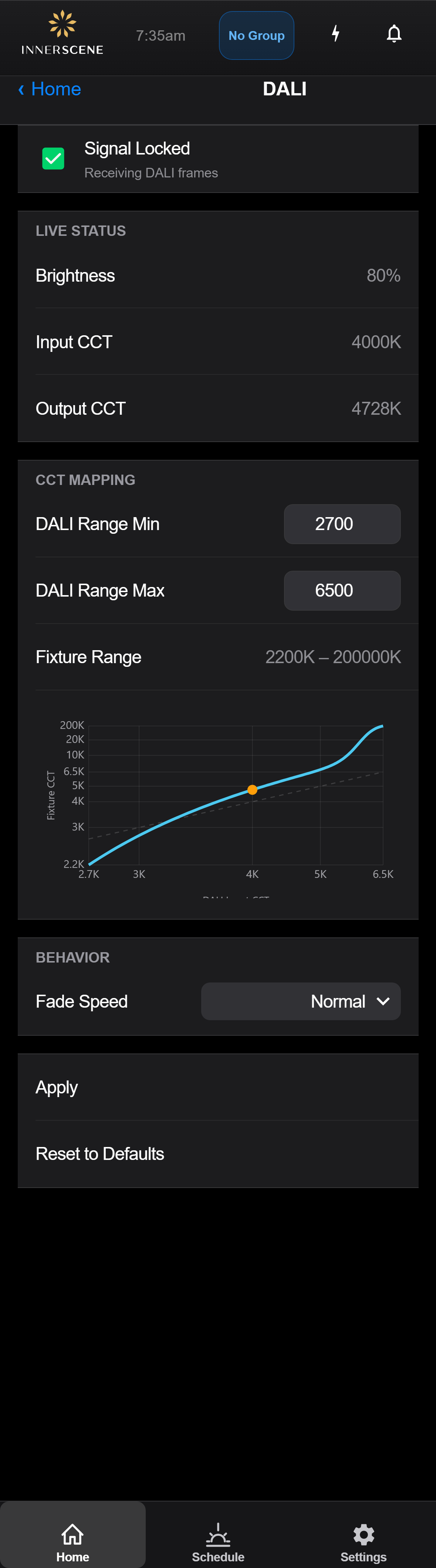
Status and configuration page for a fixture wired to a DALI control bus. Shows whether DALI commands are being received, the live brightness and color temperature being requested, the mapping between the DALI CCT range and the fixture's native range, and the fade speed.
Controls on this screen
- Signal Indicator
At-a-glance icon for the DALI bus state. Green when valid DT8 commands are arriving, dim or warning when the bus is idle or unreachable.
- Signal Status
Short label describing the current DALI bus state, for example Receiving Commands, Idle, or No DALI Signal.
- Signal Detail
Additional context on the bus state, typically the time since the last valid command or guidance to check the wiring.
- Live Brightness
Current brightness level requested by the DALI controller, shown as a percentage. Updates as the DALI master changes the output.
- Input CCT
Raw color temperature value the DALI controller is requesting, in Kelvin, before the CCT mapping is applied.
- Output CCT
Color temperature the fixture is actually driving after the input CCT has been mapped onto the fixture range, in Kelvin.
- DALI Range Min
Lower bound of the DALI color temperature range. Set this to the warmest value your DALI controller can send. Anything at or below this value maps to the fixture's warmest output.
- DALI Range Max
Upper bound of the DALI color temperature range. Set this to the coolest value your DALI controller can send. Anything at or above this value maps to the fixture's coolest output.
- Fixture CCT Range
The native color temperature range of the fixture itself, in Kelvin. DALI input values are mapped linearly into this range using the min and max above.
- CCT Mapping Curve
Visual graph of how DALI input CCT values translate to the fixture output. Helpful for confirming the chosen DALI Range Min and Max line up with the controller you are using.
- Fade Speed
Sets how quickly the fixture transitions between successive DALI commands. Faster speeds feel more responsive; slower speeds smooth out flicker when the controller updates rapidly.
- Fast Snappy response. The fixture reaches the new brightness and color temperature almost immediately after each DALI command. Use in spaces where you want changes to feel direct.
- Normal (default) Balanced response, the factory default. Smooths out small jumps while still feeling responsive to controller input.
- Slow Gentle fades. The fixture eases between commands over a longer interval, masking flicker from controllers that update frequently or coarsely.
- Apply
Saves the current DALI Range Min, Max, and Fade Speed values to the fixture. Required for changes to take effect.
- Reset to Defaults
Restores DALI Range Min, Max, and Fade Speed to their factory defaults. Useful if the current values produce odd mapping behavior.
DALI Tc Command to Light Output
The DALI interface accepts DT8 tunable-white commands. The configured DALI CCT range (factory setting 2,700 K to 6,500 K, adjustable on this screen) is spread across the fixture's full 2,200 K to 200,000 K output range on a perceptually even color scale. The warm end of the DALI range reaches the fixture's warmest output and the cool end reaches its deepest sky blue.
| DALI Tc (Kelvin) | DALI Tc (mired) | Fixture CCT output |
|---|---|---|
| 2,700 K | 370 | 2,200 K |
| 3,200 K | 313 | ~3,200 K |
| 3,800 K | 263 | ~4,300 K |
| 4,500 K | 222 | ~5,700 K |
| 5,000 K | 200 | ~6,800 K |
| 5,500 K | 182 | ~9,400 K |
| 6,000 K | 167 | ~27,000 K |
| 6,500 K | 154 | 200,000 K |
- Brightness: the DALI dim level applies linearly, so a 50% level produces 50% of the fixture's maximum output at the current color temperature, and level 0 is off.
- Tc commands outside the configured range are clamped to the nearest end.
- Narrowing or widening the DALI CCT range on this screen re-spreads the fixture's full output range across the new command range.
Open this screen in the interactive guide to explore it with clickable callouts, search, and a live simulator, or browse all screens.