External Inputs screen
Casambi
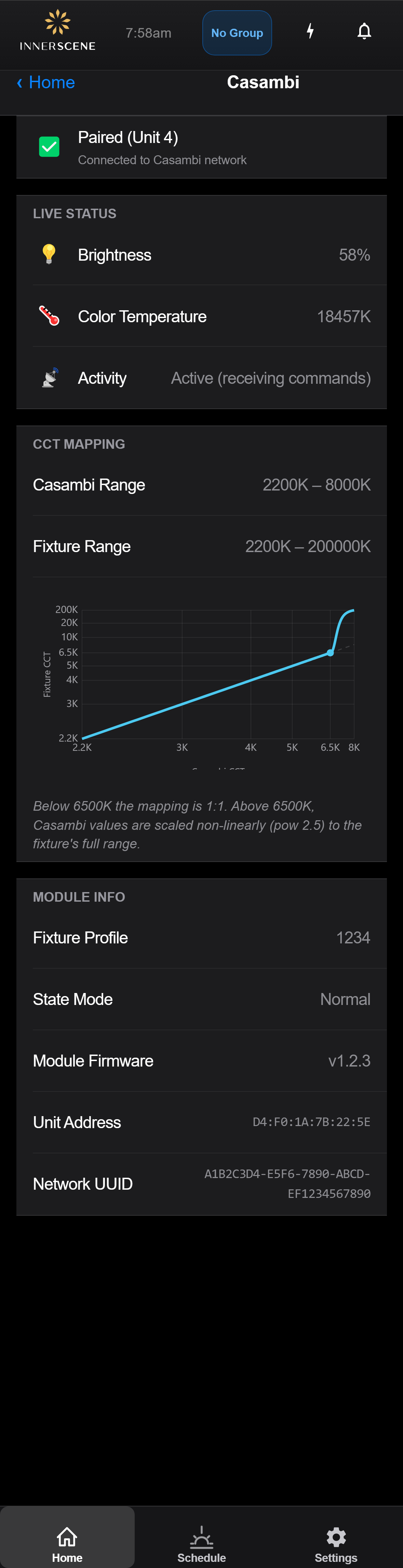
Status and configuration page for a fixture equipped with a Casambi daughterboard. Shows pairing status with the Casambi network, live brightness/CCT readings from the wireless mesh, the CCT mapping curve between Casambi values and the fixture's range, and module identification info.
Controls on this screen
- Pairing Status
Indicates whether the Casambi module is currently paired with a Casambi network. Paired modules accept lighting commands from the Casambi app and any associated wireless switches; unpaired modules ignore Casambi traffic and behave as a stand-alone fixture.
- Pairing Detail
Additional context for the pairing status — typically the name of the paired network, or instructions to pair the module via the Casambi mobile app.
- Live Brightness
Current brightness level being driven by the Casambi network, shown as a percentage. Updates in near real-time as Casambi controls the fixture.
- Live Color Temperature
Current color temperature requested by the Casambi network, shown in Kelvin. Reflects the fixture's actual output after applying the CCT mapping shown below.
- Activity
Indicates whether Casambi is actively driving the fixture or sitting idle. Useful for confirming a Casambi command actually reached the module.
- Casambi CCT Range
The color-temperature range that Casambi can request, in Kelvin. This is the range exposed to the Casambi app/wireless switches.
- Fixture CCT Range
The native color-temperature range of the fixture itself. Casambi values are mapped onto this range so requests outside the Casambi range still produce reasonable output.
- CCT Mapping Curve
Visual graph of how Casambi color-temperature values translate to the fixture's output. Below 6500K the mapping is 1:1; above 6500K, Casambi values are scaled non-linearly (power 2.5) to reach the fixture's full upper range without sacrificing resolution at typical color temperatures.
- Mapping Description
Explanation of the mapping shape. Below 6500K the mapping is direct; above 6500K the curve compresses higher Casambi values to access the fixture's extended cool range.
- Fixture Profile
Identifier of the Casambi fixture profile this module is operating as. Determines which DT-8 commands the module accepts and how it advertises itself on the Casambi network.
- State Mode
Internal operating mode of the Casambi module — typically reflects whether it is in normal operation, pairing, or error state.
- Module Firmware
Firmware version reported by the Casambi daughterboard. This is separate from the fixture's main firmware shown on the [[device_info|Device Info]] page.
- Unit Address
The Casambi unit address — a short identifier used within the Casambi network to route commands to this specific module.
- Network UUID
The unique identifier of the Casambi network this module is currently paired with. Used by the Casambi app and other Casambi devices to recognise this network.
Casambi Slider to Light Output
The Casambi app presents a dim level and a color temperature slider. The fixture reports a 2,200 K to 8,000 K control range to Casambi. Up to 6,500 K the slider maps 1:1 to the light output. Because the fixture's sky range extends far beyond what Casambi's tunable-white profile can represent, the top of the slider (6,500 K to 8,000 K) expands onto 6,500 K to 200,000 K with a curve that keeps fine control near daylight white.
| Casambi CCT slider | Fixture CCT output |
|---|---|
| 2,200 K | 2,200 K |
| 4,000 K | 4,000 K |
| 6,500 K | 6,500 K |
| 7,000 K | ~18,900 K |
| 7,250 K | ~40,700 K |
| 7,500 K | ~76,700 K |
| 8,000 K | 200,000 K |
- Brightness: the Casambi dim level applies linearly with 12-bit (4,096-step) resolution; 50% is half of the fixture's maximum output at the current color temperature.
- Some fixture profiles report an extended 2,200 K to 16,000 K range to Casambi; the same expansion then applies above 6,500 K across the wider span.
- Setting the third Casambi channel (Circadian) to its top of range hands control to the fixture's built-in schedule.
- If Casambi stops sending updates the fixture holds its last values; the Casambi card on the home screen shows as inactive after 30 seconds.
Open this screen in the interactive guide to explore it with clickable callouts, search, and a live simulator, or browse all screens.