Advanced screen
Confirm Calibration Delete
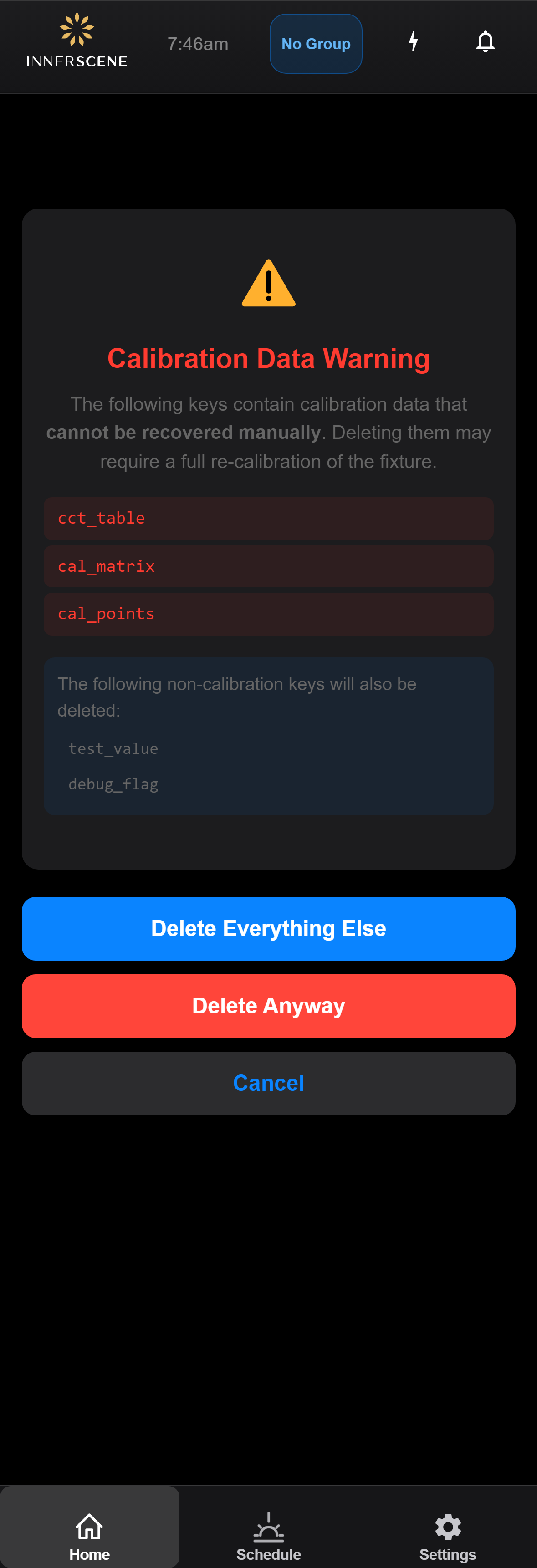
Safety prompt shown when you attempt to delete one or more keys that contain calibration data. Calibration is not user-recoverable without rerunning the full calibration procedure, so this dialog asks you to confirm before destroying it. Reached from the [[edit_values|Device Values]] page when the selected rows include calibration keys.
Controls on this screen
- Calibration Keys to Delete
List of the specific calibration-data keys that will be deleted if you proceed. These are the unrecoverable entries — once deleted, the fixture must be re-calibrated against a reference target to restore them.
- Non-calibration Keys Note
Conditional section shown when the bulk selection also includes non-calibration keys. Lists those entries separately so you can see the full scope of what will be deleted alongside the calibration data.
- Non-calibration Keys List
The non-calibration entries included in this bulk delete. These are safe to delete without losing calibration, but are shown so the consequences of each button are clear.
- Delete Everything Else
Skips the calibration keys and deletes only the non-calibration entries listed above. Use when you want to clean up other keys without losing the fixture's calibration.
- Delete Anyway
Proceeds with the deletion of everything, including the calibration keys. The fixture will need to be re-calibrated afterwards. Cannot be undone.
- Cancel
Returns to the [[edit_values|Device Values]] page without deleting anything. The current bulk selection is preserved so you can adjust which rows are checked before trying again.
Open this screen in the interactive guide to explore it with clickable callouts, search, and a live simulator, or browse all screens.