Introducing CircadianLab: Free Browser-Based Lighting Simulation with mel-EDI, Glare, and Daylight
Getting a lighting layout to meet WELL v2 melanopic targets while controlling glare, modeling daylight, and staying on budget has always meant expensive desktop software, manufacturer-specific plugins, or a lot of spreadsheet guesswork. We built CircadianLab to change that.
CircadianLab is a free, browser-based lighting simulator purpose-built for circadian lighting design. It calculates melanopic equivalent daylight illuminance (mel-EDI), photopic illuminance, Unified Glare Rating (UGR), and daylight from windows and skylights, with full radiosity-based inter-reflection. The radiosity solver runs on WebGPU when available (with WebGL 2 and pure-JS fallbacks), so a typical room solves in a few seconds in your browser. No software to install, no files uploaded to any server, no account required.
A note on terminology: throughout this article we use mel-EDI (melanopic Equivalent Daylight Illuminance, per CIE S 026:2018), the metric formerly called EML. They are the same quantity; CIE S 026 standardized the name.
Whether you are a lighting designer evaluating mel-EDI versus glare tradeoffs, an architect specifying fixtures for a WELL certification, a daylight consultant studying a window layout at any latitude, or a facilities manager upgrading a windowless office, CircadianLab gives you a complete picture of melanopic light delivery in minutes.
Live Physics in Your Browser
CircadianLab does not use simplified lookup tables or cone approximations. Every result comes out of a physically-based engine:
- Reads real IES photometric files (IESNA LM-63) and uses bilinear interpolation across the full candela distribution to calculate direct illuminance via the inverse-square law.
- Runs a 3-bounce radiosity solver with form factor computation and visibility testing. Reflected light from walls, floor, and ceiling is accounted for, not just direct light.
- Calculates UGR glare per CIE 117:1995, including the Guth position index for each fixture relative to the observer's line of sight.
- Converts photopic illuminance to mel-EDI using the Daylight Equivalent Ratio (DER) from CIE S 026:2018, with per-fixture DER tables for standard LEDs, fluorescents, and Circadian Sky luminaires.
WebGPU-accelerated radiosity
The indirect-illuminance gather (the most expensive single step of the solve) runs on WebGPU when your browser supports it, with a WebGL 2 fallback for older browsers and a pure-JS path for everything else. On real hardware the GPU gather is typically 20x to 50x faster than the JS path; end to end a realistic office scene solves 3x to 5x faster overall, which is what lets the heatmap update every time you drag a fixture. The result panel shows a small WebGPU accelerated or WebGL 2 accelerated badge whenever the GPU path was used.
Three Metrics, Five Directions
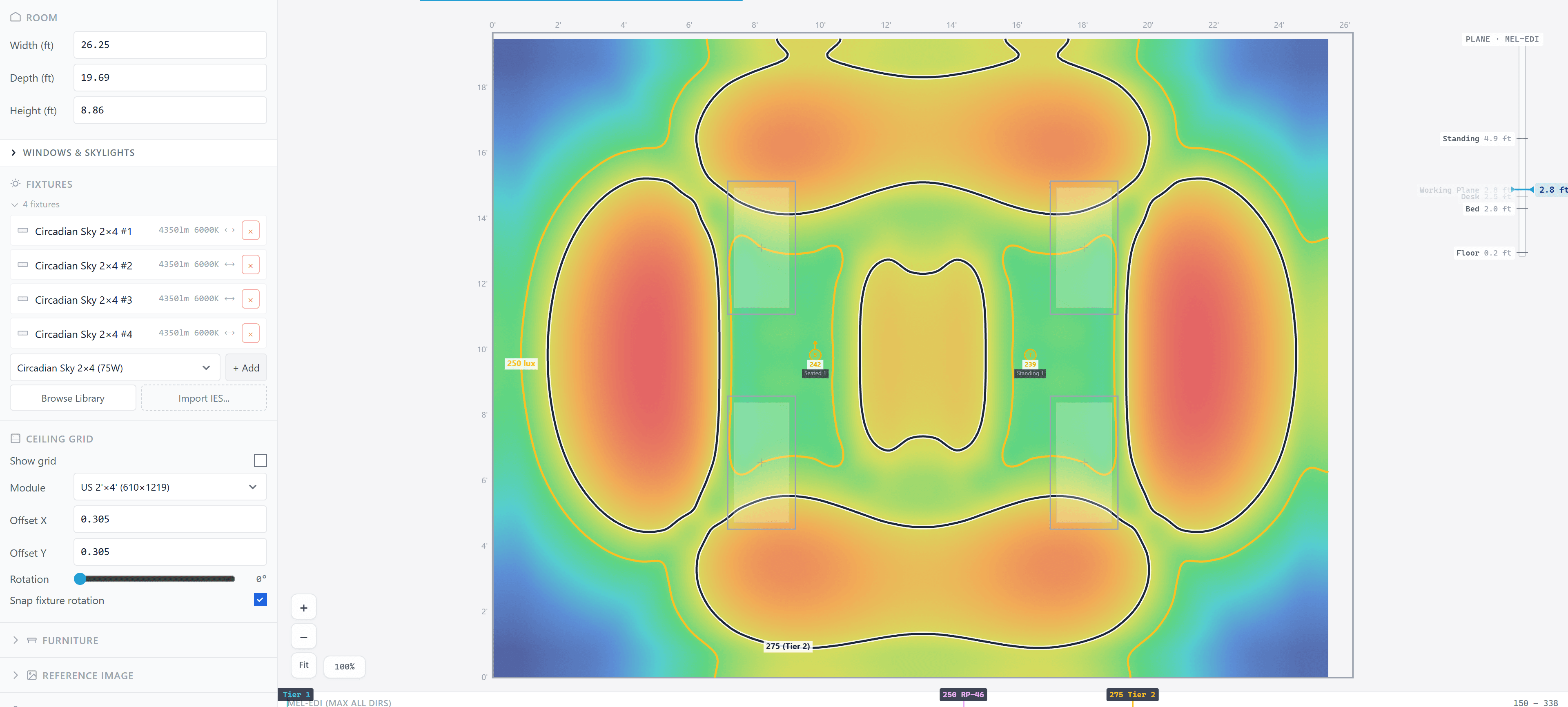
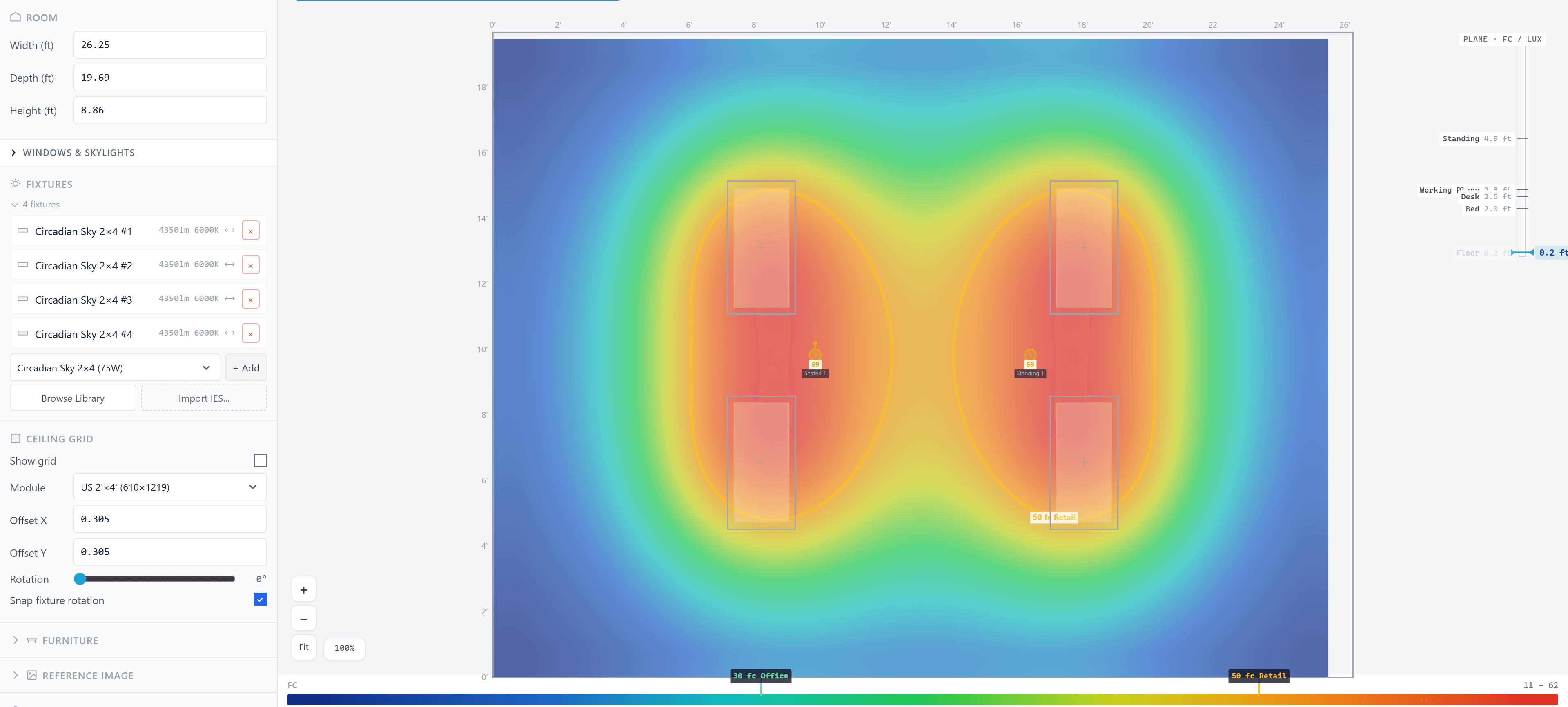
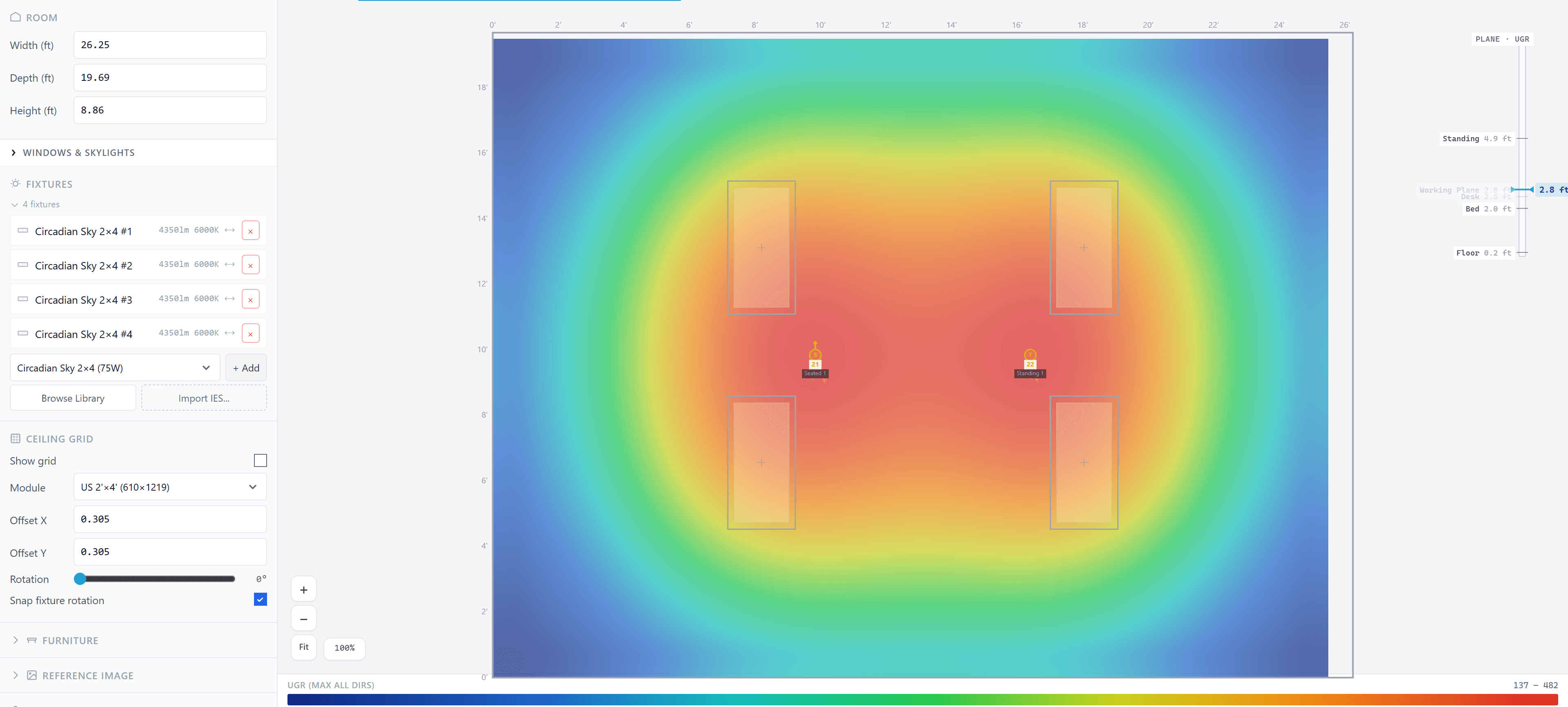
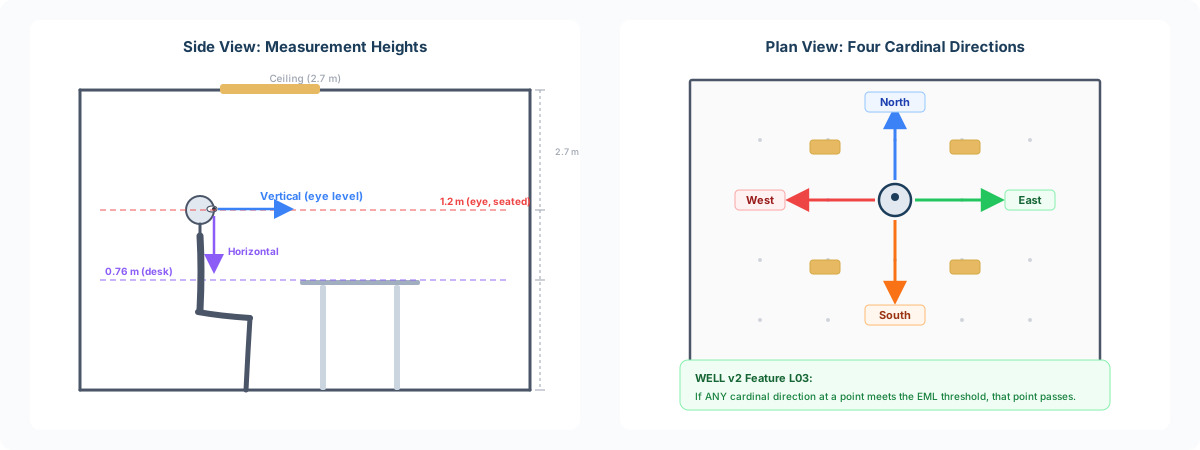
The circadian response depends on light entering the eye, not light hitting the desk. That is why WELL v2 Feature L03 specifies mel-EDI measured at the vertical plane at eye level, not at the horizontal work surface. CircadianLab measures every grid point in five directions:
- Horizontal, desk-height illuminance (0.76 m) for task lighting requirements.
- North, East, South, West, vertical mel-EDI at eye height (1.2 m seated, 1.5 m standing) for circadian compliance.
Switch between directions in the heatmap to see which seats pass and which need more melanopic light. If any cardinal direction at a point meets the WELL threshold, that point qualifies.
See It in 3D, Person by Person
CircadianLab offers two visualization modes that share the same solve:
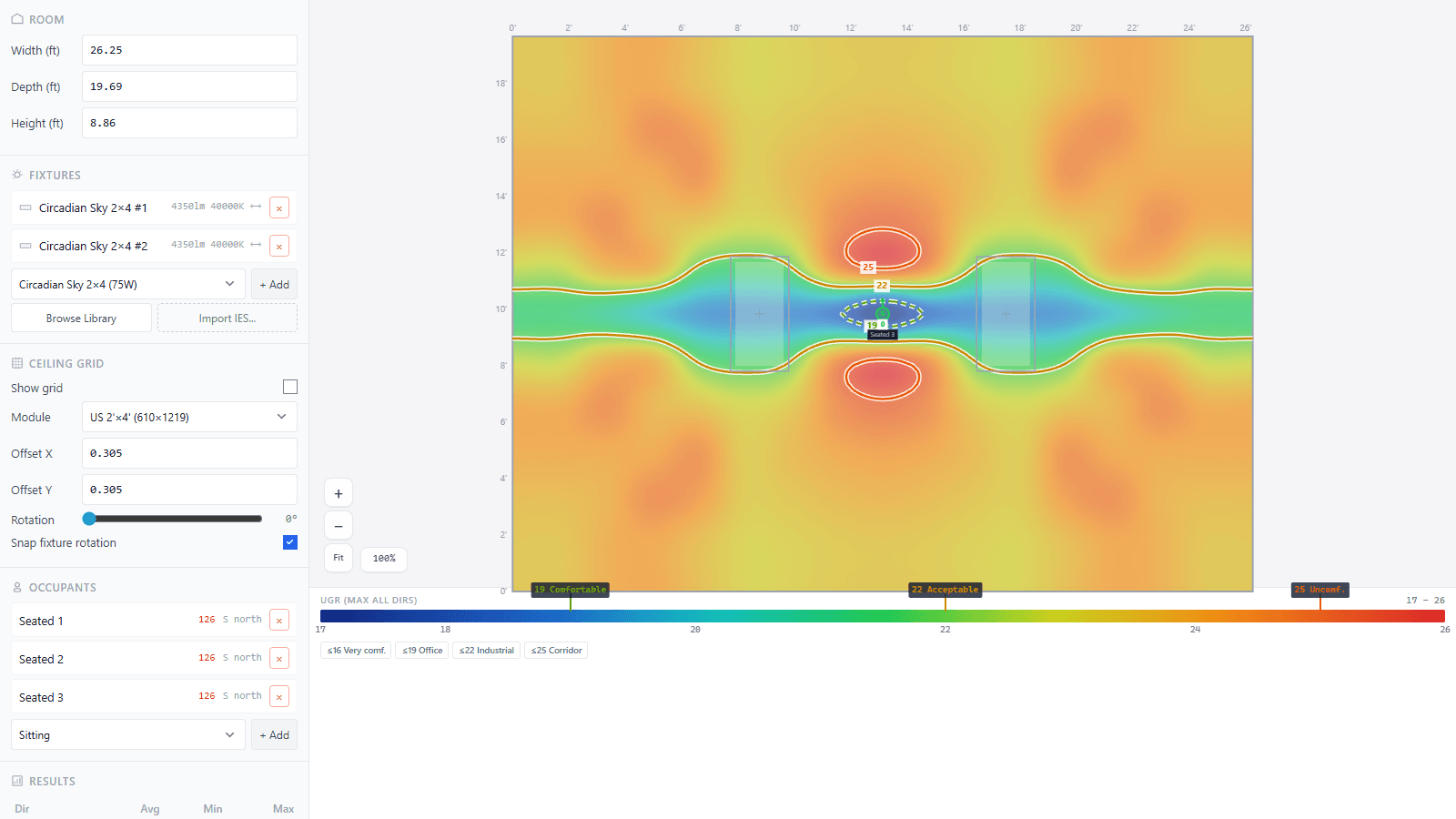
- 2D heatmap, a plan-view color map with a 256-step gradient, contour lines at user-defined intervals, and numeric values overlaid on the grid. Pan, zoom, and switch between metrics and directions instantly.
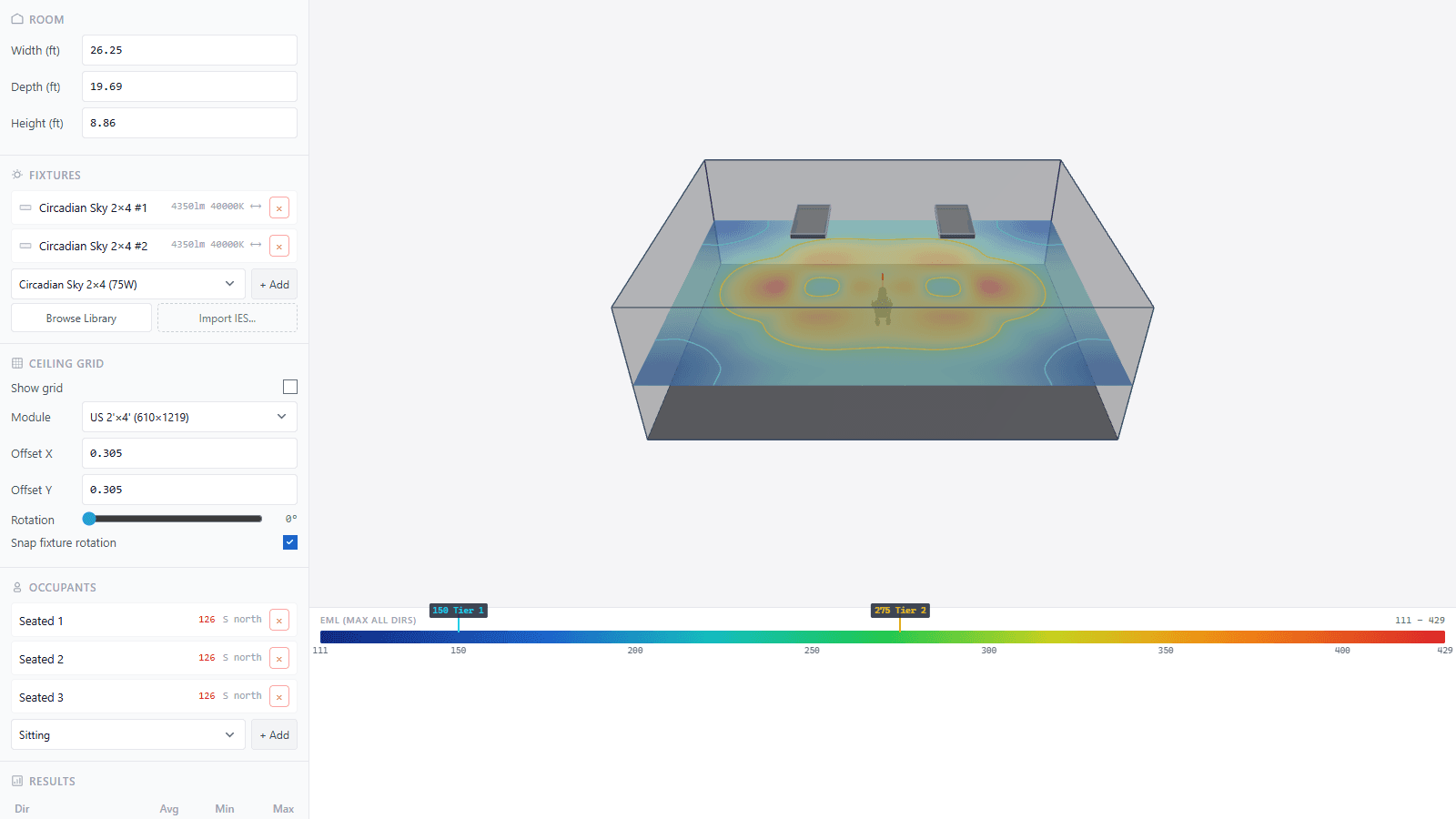
- 3D room view, an interactive three-dimensional rendering with textured surfaces, fixture positions, occupant figures, and heatmap projections. Orbit, pan, and zoom to see the space from any angle. The measurement plane can be moved up and down while the solve re-runs.
Place occupants at real desk positions
Add occupants to the floor plan at their actual desk locations, with a facing direction (N, S, E, W) and posture (sitting at 1.2 m, standing at 1.5 m, or laying at 0.3 m). CircadianLab reports per-occupant mel-EDI, illuminance, UGR, and WELL pass/fail status, so you know exactly which seats need attention.
250,000+ Fixtures, Plus Your Own
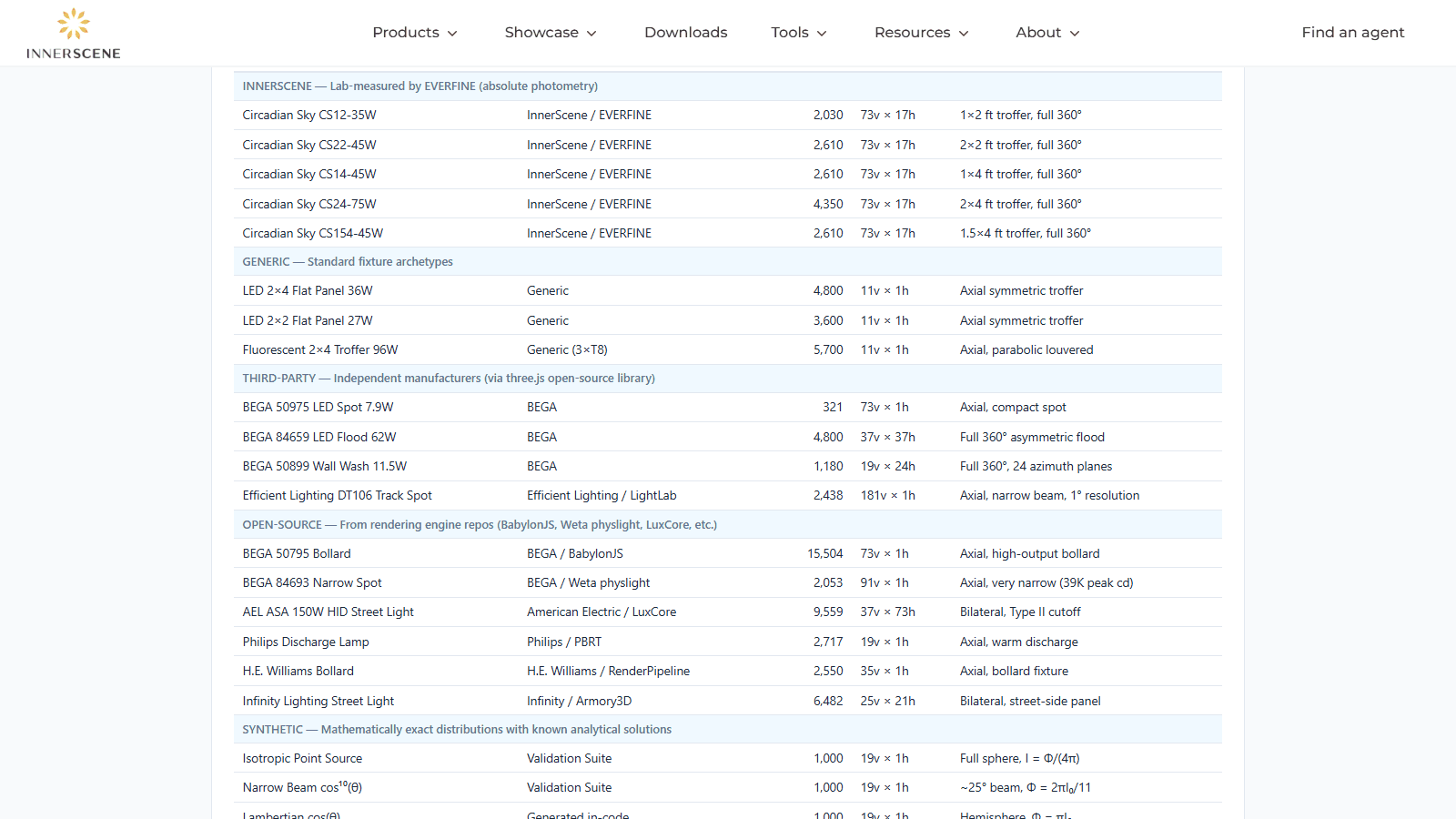
CircadianLab ships with a built-in library of over 250,000 luminaires with real IES photometry from manufacturers including Acuity Brands, Cooper Lighting, BEGA, ERCO, Signify (Philips), Lutron, Cree, Artemide, GE Current, Zumtobel, iGuzzini, and dozens more. You can also upload your own IES files for any fixture not in the library, with an optional custom melanopic DER override if you have measured spectral data.
Fixture types span the full range of architectural lighting: downlights, troffers, flat panels, linear strips, wall washers, spot/track, high bays, bollards, and even film/studio and theatre fixtures.
Circadian Sky presets with measured spectral data
Circadian Sky fixtures include a 22-point melanopic DER table derived from real spectral power distribution measurements, giving the most accurate mel-EDI predictions possible for tunable circadian luminaires.
A core insight of circadian lighting design is that higher correlated color temperatures deliver more melanopic content per lux. CircadianLab lets you adjust CCT from 2,200 K to 200,000 K with a real-time slider. As you move it, the melanopic DER updates from calibrated lookup tables and mel-EDI recalculates across the entire room instantly.
Daylight, Unified with Electric Light
CircadianLab models daylight as a first-class light source, on the same footing as your electric fixtures. Add wall windows or ceiling skylights, set glazing properties (transmittance, reflectance, diffusion), pick a date and time, and the engine does the rest:
- Sun position from the NREL Solar Position Algorithm, accurate to arc-seconds for any date, time, and latitude/longitude.
- Sky brightness from a Perez clear/intermediate/overcast model, parameterized by sun altitude, atmospheric turbidity, and cloud cover.
- Direct beam and diffuse sky are added as initial flux on every radiosity patch and measurement point, then bounced through the same form-factor network as the electric fixtures. One unified solve, one combined heatmap.
- Time and date scrubbing reruns the whole solve, so you can watch a winter sunbeam crawl across the floor or compare a 9 a.m. east-facing room with a 3 p.m. west-facing one in seconds.
Why does my winter sunbeam show only a handful of foot-candles?
That is correct physics. Atmospheric airmass (the column of air sunlight passes through) is roughly 1/sin(altitude). At sun altitude 25 degrees the airmass is about 2.4 and clear-sky direct normal illuminance is around 64,000 lux. At altitude 2.5 degrees, 15 minutes before sunset on the winter solstice in Chicago, the airmass jumps to about 18 and DNI collapses to roughly 770 lux. Combine that with the small cos(zenith) factor on horizontal surfaces and the workplane sees only a few foot-candles of direct beam. Move the time slider toward solar noon to see thousands of foot-candles in the same beam.
Built-In Compliance: WELL v2 and ANSI/IES RP-46-25
CircadianLab automatically evaluates every measurement point against two standards for daytime melanopic light:
| Standard | Threshold | Measurement |
|---|---|---|
| WELL v2 Tier 2 | ≥ 250 mel-EDI | Vertical at eye level, any cardinal direction |
| ANSI/IES RP-46-25 | ≥ 250 mel-EDI (daytime min.) | Vertical at eye level |
| WELL v2 Tier 1 | ≥ 136 mel-EDI | Vertical at eye level, any cardinal direction |
The results panel shows pass/fail counts and percentage of grid points meeting each standard, plus min, max, and average statistics. The heatmap overlays compliance contour lines at 136 and 250 mel-EDI so problem zones are visually obvious.
Share With One Click
A Share button on the toolbar saves your entire session (room, fixtures, daylight configuration, camera angle, selections, results) to a unique URL. Anyone with the link sees exactly what you see. Render the same scene on an iPad in a client meeting or a Windows desktop in the studio, with no account on either end. Each share generates a new UUID and the simulation state is stored server-side so the link reopens reliably later.
Stakeholder-Ready PDF Reports
The report generator produces multi-page PDFs with up to 13 configurable sections:
- Cover with logo, project name, and QR code
- Room summary and surface reflectances
- Fixture schedule with quantities and totals
- Illuminance results (horizontal + 4 directions)
- mel-EDI results with WELL + RP-46-25 compliance
- Per-occupant analysis
- Heatmaps for every direction
- UGR glare maps
- Floor illuminance for egress
- Ceiling-grid layout drawing
- 3D views from multiple angles
- 4-page Daylight Study (when daylight is enabled)
- Methodology notes and references
The Daylight Study walks through how sun and sky illuminance change across times of day and seasons at your specific location, with per-direction mel-EDI summaries. PDFs are generated entirely in the browser, so client work never touches our servers unless you click Share.
Validated Against Known References
We take accuracy seriously. CircadianLab is validated by an internal suite of over 120 automated tests covering:
- Inverse-square law accuracy against analytic solutions.
- Cosine law of incidence for off-axis illuminance.
- IES file parsing and lumen integration against 20 real photometric files from 8 manufacturers.
- Radiosity energy conservation (closed-room energy balance).
- UGR Guth position index against CIE 117 reference values.
- Melanopic DER accuracy across the full CCT range.
- NREL Solar Position Algorithm cross-checked against published reference values.
Everything Else
Surface reflectances
Set wall, floor, and ceiling reflectance (0 to 100%) to match real room finishes.
Wall-mounted fixtures
Mount on any wall with height and tilt control, key for reducing glare.
50-level undo/redo
Full history tracking. Experiment freely and roll back any change.
Metric and imperial
Toggle between meters/lux and feet/foot-candles. The engine always solves in SI internally.
Dimming + multi-select
Per-fixture dimming (0 to 100%). Multi-select to drag, rotate, or change CCT for a group.
Ceiling grid + array placement
Standard 2x4 US grid (or custom). Grid array tool places fixtures by count or spacing in one step.
Who Should Use CircadianLab
- Lighting designers evaluating fixture layouts for melanopic light delivery and glare control before committing to a specification.
- Architects pursuing WELL v2 certification who need to verify Feature L03 compliance during schematic design, without waiting for a full photometric analysis.
- Daylight consultants studying window placement, glazing tradeoffs, and seasonal sun paths at any latitude.
- WELL assessors and consultants who want a quick way to evaluate whether a proposed layout will meet melanopic thresholds.
- Facility managers evaluating lighting upgrades for circadian health benefits in offices, healthcare, education, or senior living spaces.
- Lighting sales engineers who need to quickly demonstrate how their fixtures perform on melanopic metrics compared to competitors.
Related Reading
- Understanding Melanopic Light and mel-EDI, what melanopic equivalent daylight illuminance means and why it matters for circadian health.
- Unified Glare Rating (UGR) Explained, how UGR is calculated and what the comfort thresholds mean.
- Correlated Color Temperature (CCT), how CCT relates to melanopic content and visual comfort.
- Maximizing mel-EDI While Managing Glare and Cost, three practical strategies for circadian lighting design.
- The Benefits of Daytime Melanopic Light Exposure, the research behind circadian lighting in workplaces and healthcare.
Try It Now
CircadianLab is available now at innerscene.com/tools/circadian-lab. No signup, no download. Open the page and start designing.
Have feedback or feature requests? Get in touch. We are actively developing CircadianLab and would love to hear what you need.
Published by Innerscene on 2026-05-12