SkySync™
أول مستشعر يلتقط اللون الحقيقي لسماء زرقاء صافية وينقله إلى إضاءتك في الداخل في الوقت الفعلي.
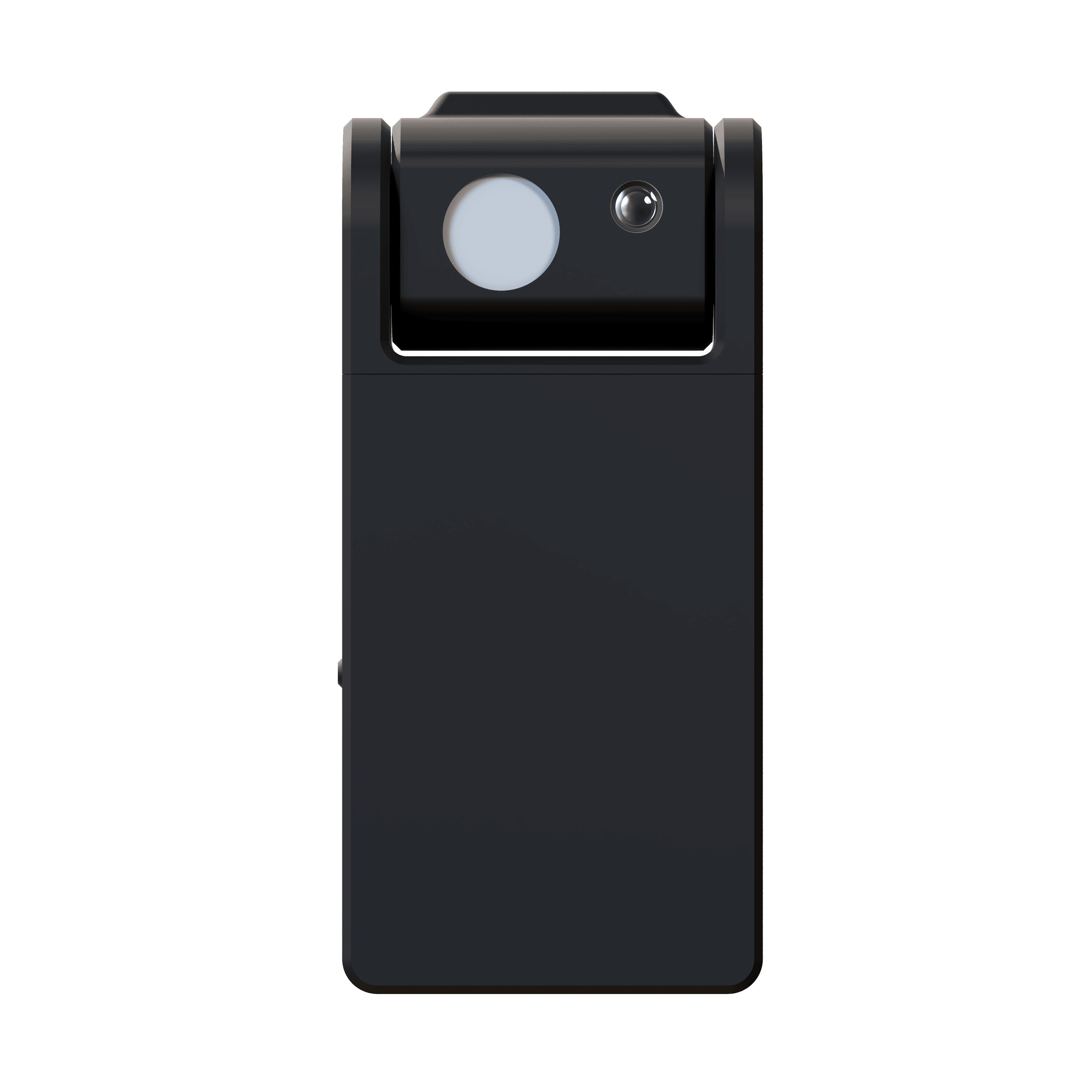
السماء الحقيقية،
إلى الداخل.
SkySync هو أول مستشعر قادر على التقاط اللون الحقيقي لسماء زرقاء. تقيس تقنيته الرائدة ثنائية المستشعر السماء بمعزل عن الضوء المحيط، وتنقل بيانات اللون في الوقت الفعلي إلى وحدات Circadian Sky وVirtual Sun.
مع مرور الغيوم وتحرك الشمس عبر السماء، تتغير إضاءتك الداخلية وتستجيب، فتجعل المساحات تنبض بالحياة وتتنفس بانسجام مع العالم الخارجي. بطارية تدوم أكثر من 10 سنوات والتركيب على النافذة الداخلية يعنيان عدم الحاجة إلى أي أسلاك.
- مستشعر السماء
- 10° FOV
- مستشعر البيئة
- 180°
- المدى
- 30 ft · 100 ft+ hub
- البطارية
- 10+ years
السماء نفسها،
في الداخل والخارج.
ثلاثة ألواح نوافذ Circadian Sky فوق خزائن مطبخ في سان فرانسيسكو، تعمل ببيانات SkySync الفورية بدلاً من لون أبيض ثابت.
تنتقل الكاميرا من الألواح إلى الشرفة لتجد ضوء النهار نفسه. الأزرق في الداخل هو الأزرق في الخارج، مقيسًا عبر الزجاج ومحدَّثًا مع تغيّر السماء.
مطبخ سكني، سان فرانسيسكو. ألواح نوافذ Circadian Sky تعمل بـ SkySync.
السماء ليست 6,500 كلفن.
تقيس المستشعرات التقليدية مزيجًا من ضوء الشمس والانعكاسات والسماء معًا، وتحسب متوسطه إلى أبيض مسطح بمظهر غائم. السماء الحقيقية في يوم صافٍ زرقاء نابضة يستحيل إعادة إنتاجها دون قياسها وحدها.
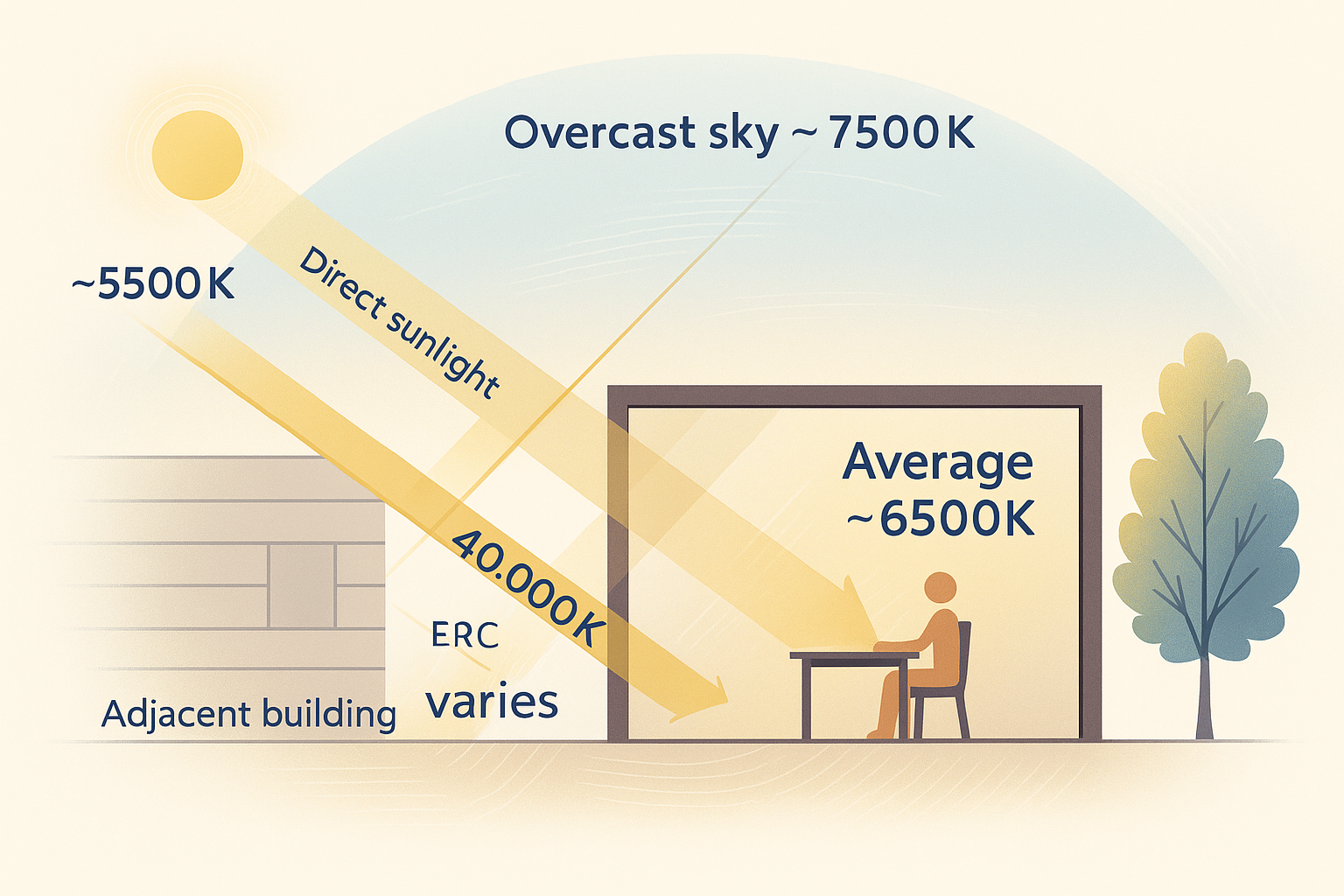
يرى كل شيء دفعة واحدة، الشمس المباشرة والسماء الغائمة والضوء المرتد عن المباني القريبة، ويحسب متوسطه في قراءة واحدة مسطحة باهتة.
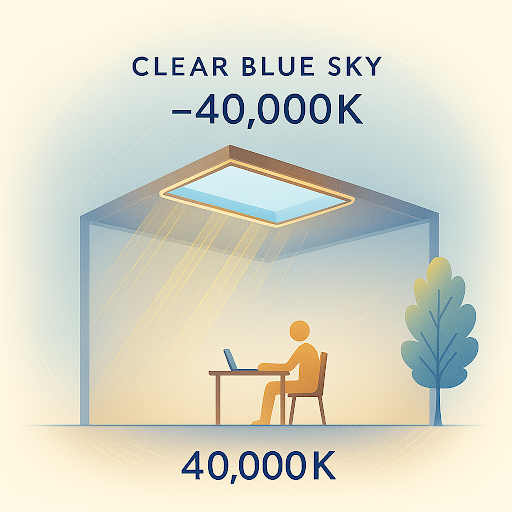
ينظر إلى السماء فقط، ملتقطًا الأزرق العميق ليوم صافٍ لا يمكن لقراءة مختلطة أن تراه أبدًا.
ضوء الشمس، وسماوات غائمة وزرقاء، وضوء منعكس، كلها ممزوجة في قراءة مسطحة.
السماء الصافية بذاتها، زرقاء نابضة وتتغير باستمرار مع تقدم اليوم.
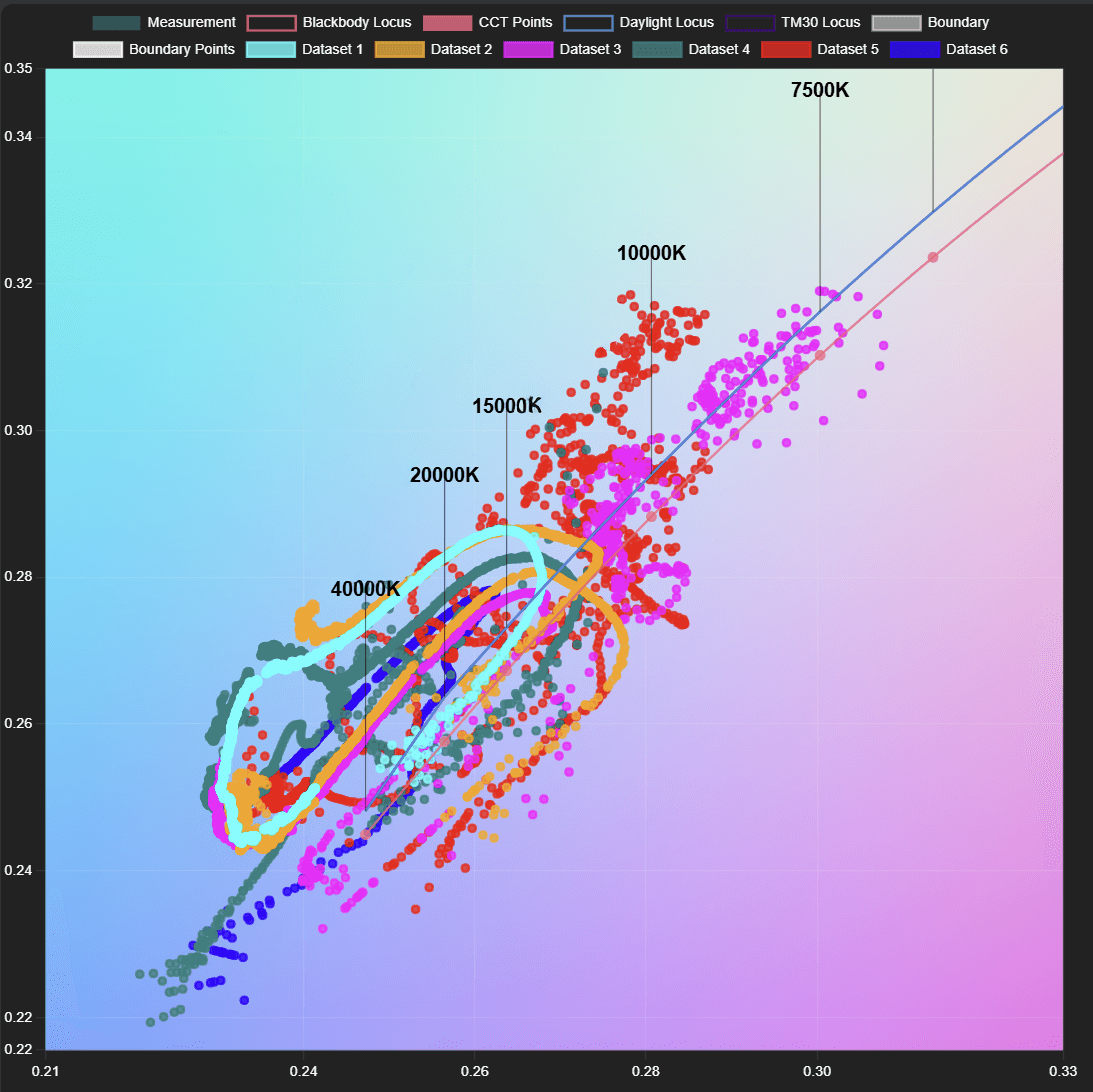
كل نقطة قياس حقيقي للسماء. تتغير السماء بشكل كبير كل بضع دقائق مع مرور الغيوم وتحرك الشمس، نطاق حي لا يمكن لمتوسط ثابت واحد أن يلتقطه أبدًا.
مستشعر سماء بزاوية 10°
مستشعر اتجاهي ضيق يقيس لون السماء الحقيقي بشكل مستقل، ملتقطًا النطاق الكامل، من 6,500 كلفن للغيوم إلى سماء زرقاء تتجاوز 200,000 كلفن.
مستشعر بيئة بزاوية 180°
مجمّع منتشر يقرأ الضوء المحيط من جميع الاتجاهات لإعادة إنتاج بيئي دقيق، إلى جانب قراءة السماء.
أربع طرق لتوصيل السماء.
من الاتصال اللاسلكي المباشر البسيط إلى عمليات النشر البعيدة عبر السحابة، يتكيف SkySync مع أي تركيب، من غرفة واحدة إلى حرم متعدد المواقع.
أبسط تهيئة. يبث SkySync مباشرة إلى الوحدات القريبة عبر 2.4 جيجاهرتز، ضمن نحو 9 أمتار، دون أي بنية شبكة.
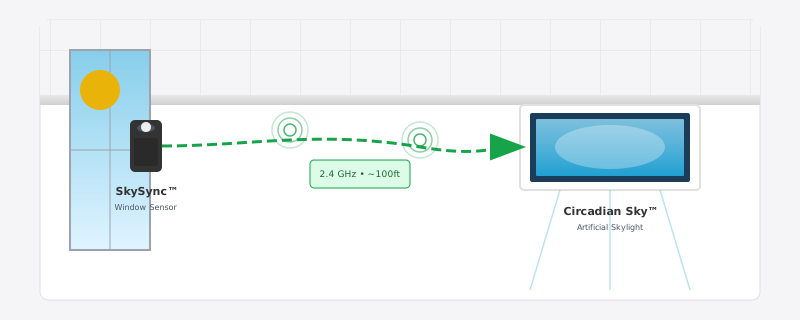
ثلاثة من هذه المسارات الأربعة تمر عبر Innerscene Mini Hub، البوابة المرفقة في كل علبة SkySync.
طريقتان لتتولى التحكم.
بمجرد وصول بيانات السماء، تعمل وحداتك في أحد وضعين وتنتقل بينهما من تلقاء نفسها، فتظل الغرفة دائمًا إما تتابع السماء أو الشخص الموجود فيها.
وضع الجدول
تتبع الوحدات بيانات SkySync في الوقت الفعلي، معيدةً إنتاج الضوء الخارجي مع تحرك الشمس ومرور الغيوم.
شاهد ما يتحكم به SkySyncتجاوز الباهت
يأخذ الباهت الخارجي الأولوية على الجدول متى أراد أحد التحكم اليدوي في مساحة.
شاهد تجاوز SkySync على الجدولالتبديل التلقائي. تكتشف الوحدات الإعتام الخارجي من تلقاء نفسها وتعود إلى وضع الجدول عندما يصبح الباهت خاملًا، أو بعد دورة تشغيل، أو من التطبيق، فلا يحتاج أحد إلى تذكّر إعادة التحكم إلى السماء.
مستشعر صغير، هندسة جادة.
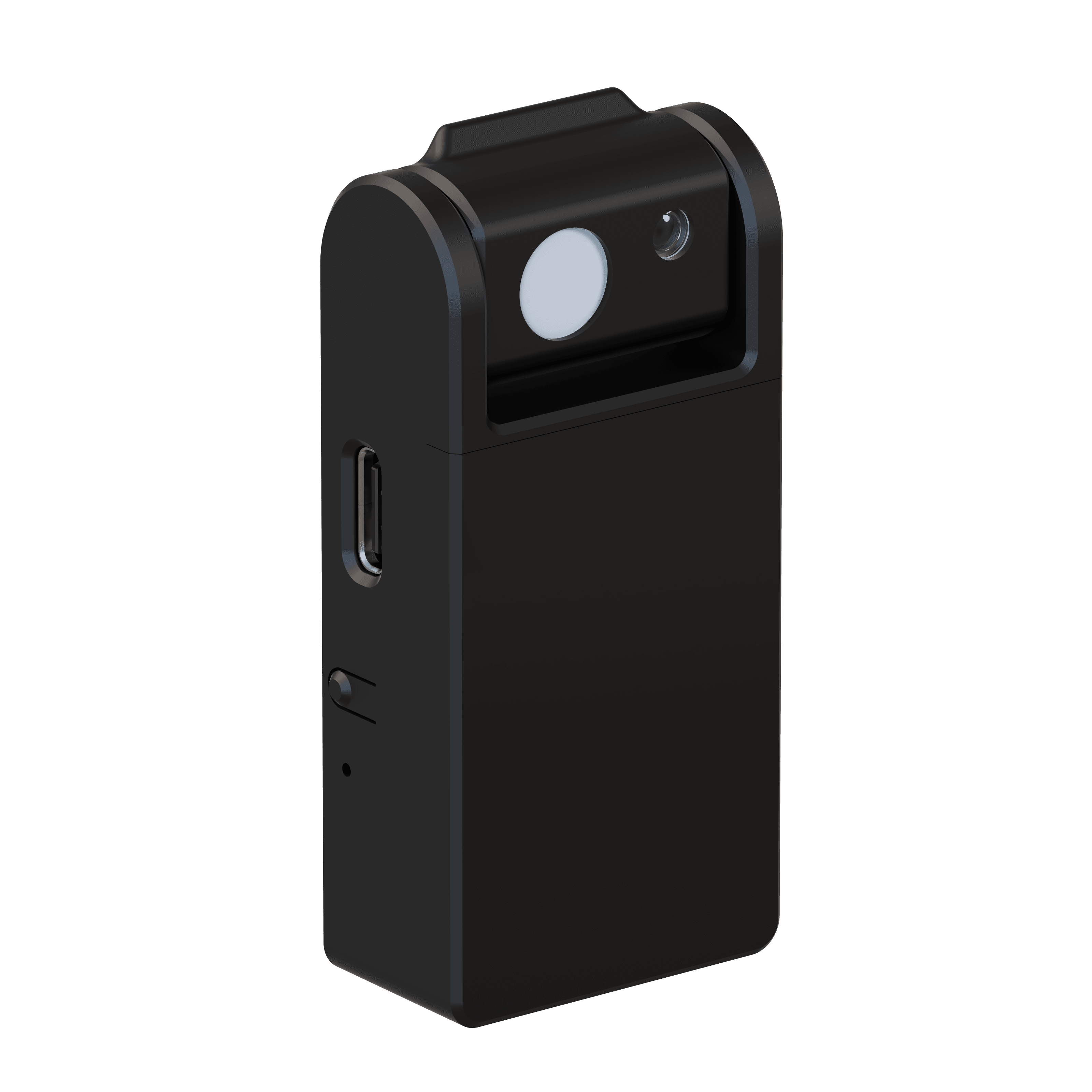
- مستشعر السماء
- 10° narrow field of view
- مستشعر البيئة
- 180° diffuse light collector
- المدى اللاسلكي
- 30 ft direct · 100 ft+ with included Mini Hub
- الإعداد
- Bluetooth Low Energy (BLE)
- الاتصال
- 2.4 GHz ISM band · no router required
- الطاقة
- 10+ year replaceable battery (CR2477)
- تصنيف IP
- IP20 · indoor use only
- السلامة
- UL 916 · UL 1642 listed battery
- متوافق مع
- Circadian Sky, Virtual Sun
- التركيب
- Removable tape mount to interior windows
جاهز خلال دقائق.
لا أسلاك ولا كهربائي. يُركَّب SkySync داخل النافذة بشريط قابل للإزالة، فيقرأ الضوء نفسه الذي تراه مساحتك.
اختر نافذة
اختر أي نافذة ذات رؤية صافية للسماء للاستشعار الأمثل.
ركّب المستشعر
انزع الغطاء اللاصق واضغطه على الزجاج الداخلي بالزاوية الموصى بها.
هيّئ
أنشئ الاتصال اللاسلكي من تطبيق Innerscene عبر Bluetooth.
اقترن بالوحدات
اربط SkySync بوحدات Circadian Sky أو Virtual Sun، وستكون جاهزًا.
يُركَّب داخل النافذة فيقرأ الضوء نفسه الذي تراه مساحتك، ملتقطًا تحولات اللون من الزجاج المعتّم أو منخفض الحديد دون أي صيانة. يمكن لتعزيز CCT اختياري أن ينقل النتيجة إلى درجات أدفأ أو أبرد لتلائم الغرفة.
وسّع مداك
مع Mini Hub.
يأتي كل SkySync مع Innerscene Mini Hub، بوابة صغيرة تنقل بيانات السماء في الوقت الفعلي إلى وحدات تتجاوز المدى اللاسلكي المباشر. عندما تعترض الجدران أو المسافة أو تعدد الغرف الطريق، يبقي Mini Hub مساحتك بأكملها متزامنة.
- مُرحِّل لاسلكي
يعيد البث على راديو 2.4 جيجاهرتز أقوى. دون شبكة أو إعداد.
- شبكة محلية
يبث بيانات السماء إلى الوحدات عبر شبكتك المحلية باستخدام UDP.
- خدمات سحابية
يُرحّل عبر Innerscene Cloud (TCP) للوصول إلى وحدات بعيدة.
- طاقة مرنة
Power over Ethernet (PoE) أو USB-C.
- اتصال مزدوج
WiFi أو Ethernet (DHCP).
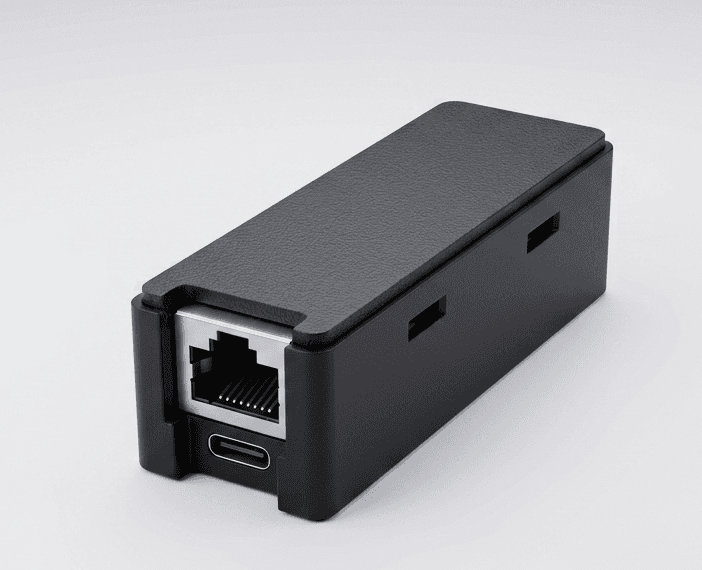
- الاستقبال
- BLE · 50 ft range
- الطاقة
- PoE (802.3af) or USB-C · 0.5 W
- الشبكة
- 10/100 Ethernet (DHCP) · 2.4 GHz WiFi
- المخارج
- Wireless rebroadcast · UDP · Cloud (TCP, SSL)
- متوافق
- Virtual Sun · Circadian Sky
- التركيب
- 2 screws, any surface · 0–40°C
مصمم للمنظومة بأكملها.
Circadian Sky وVirtual Sun هما الوحدتان الوحيدتان واسعتا الطيف القادرتان على إعادة إنتاج لون السماء الزرقاء الديناميكي، الشريك المثالي لاستشعار SkySync الرائد.
Circadian Sky
تعيد التقنية واسعة الطيف إنتاج نطاق ألوان السماء بالكامل، من درجات الغروب الدافئة عند 2,200 كلفن إلى السماء الزرقاء النابضة التي تتجاوز 200,000 كلفن.
- إعادة إنتاج لون بطيف كامل حتى أكثر من 200,000 كلفن
- مزامنة في الوقت الفعلي مع أحوال السماء الخارجية
- انتقالات ديناميكية مع تغير الغيوم والطقس
Virtual Sun
تعيد التقنية واسعة الطيف إنتاج نطاق ألوان الشمس بالكامل على مدار اليوم، متحركةً ومتغيرةً بانسجام مع الشمس الحقيقية في الخارج.
- طيف واسع، من شروق دافئ إلى سماء زرقاء نابضة
- موضع الشمس وشدتها ولونها متزامنة
- تغطية سحابية وتأثيرات جوية في الوقت الفعلي
سماؤك، في يدك.
Innerscene Studio هو التطبيق الرسمي لكل وحدة Circadian Sky وVirtual Sun تمتلكها. اتصل عبر Bluetooth، وصمّم جدولك اليومي، وتزامن مع السماء الحقيقية، كل ذلك من هاتفك أو جهازك اللوحي.
- اتصال Bluetooth آمن
افتح التطبيق بالقرب من أي وحدة فتظهر فورًا، دون رموز QR ودون بوابات إعداد. ويظل التحكم محميًا بكلمة المرور التي تحددها عند التشغيل.
- تحكم مباشر
درجة حرارة اللون والسطوع والجدول التلقائي، كلها من شاشة رئيسية واحدة.
- محرر الجداول
ارسم منحناك اليومي الخاص بأي عدد من النقاط، ثم صدّره أو استورده كملف.
- تكامل SkySync
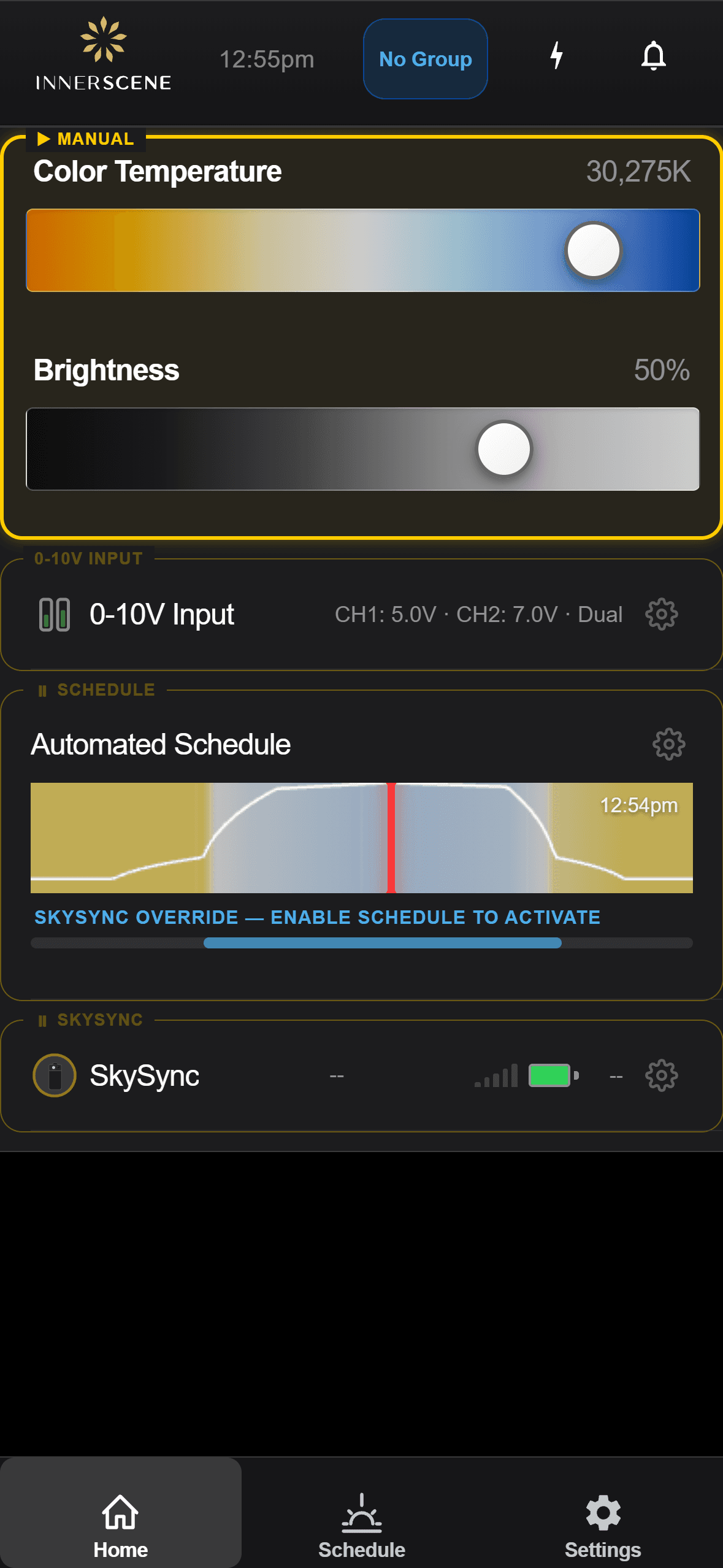
اقترن بمستشعر SkySync مثبَّت على النافذة وشاهد نوافذك ومناورك الافتراضية تتابع أحوال السماء الحقيقية (CCT واللوكس وكل شيء) في الوقت الفعلي.
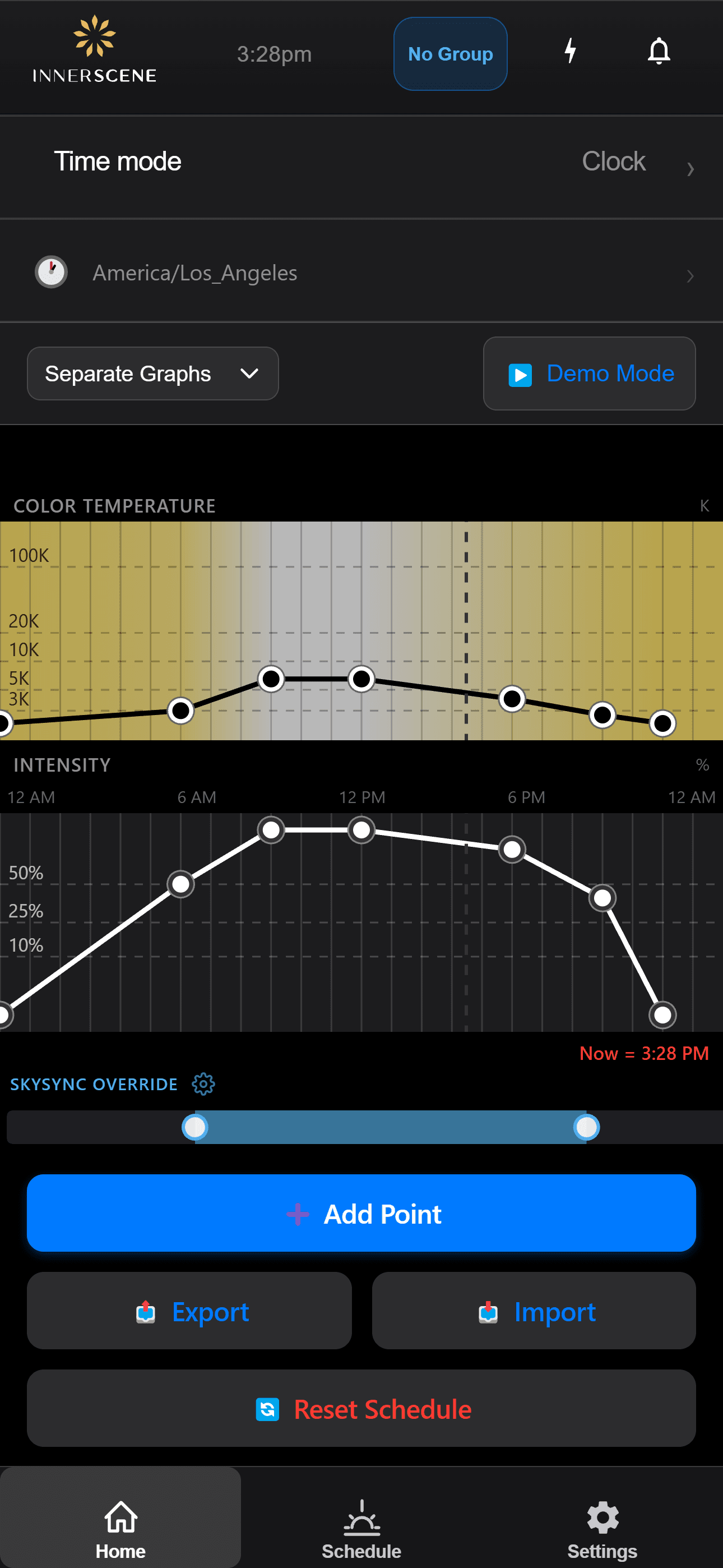
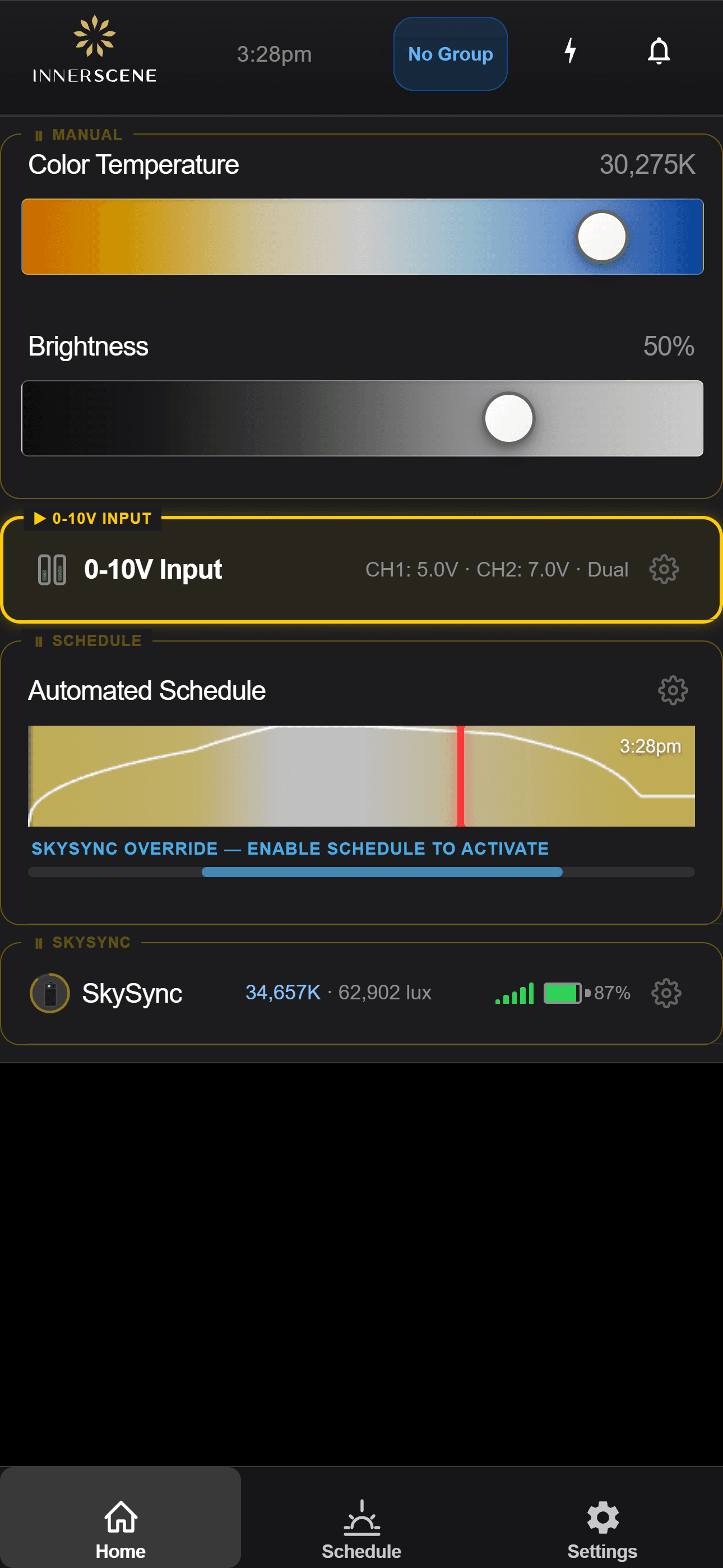
الإعداد والمراقبة من هاتفك.
يُهيّأ SkySync ويُراقَب مباشرةً داخل تطبيق Innerscene على وحدات Circadian Sky وVirtual Sun. تنقّل عبر الشاشات لترى كيف يعمل.
تم اكتشاف مستشعر
تكتشف وحدة SkySync قريبًا وتعرض الاقتران به.
فتح في الدليل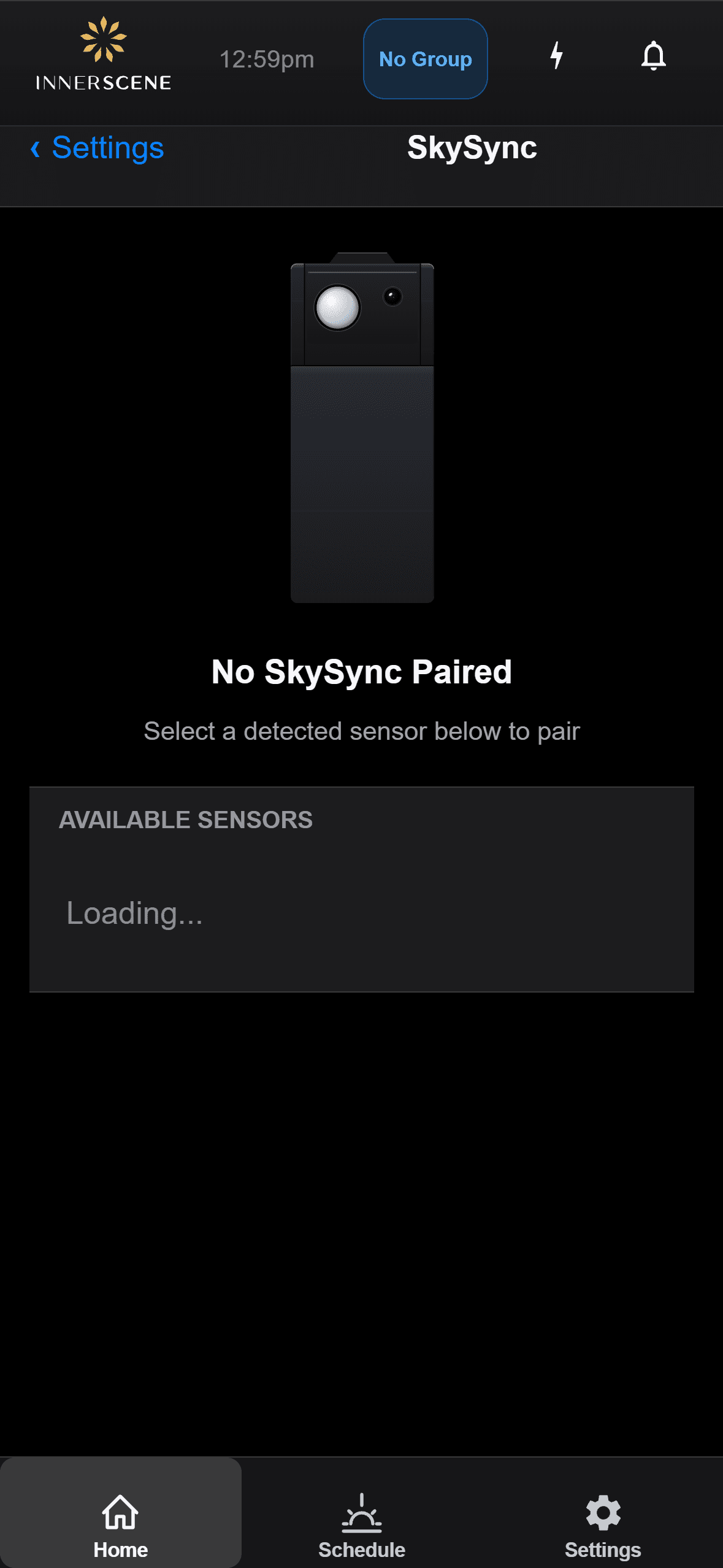
الاقتران
اقرن SkySync بوحدة، أو ألغِ اقترانه لتبديل المستشعرات.
فتح في الدليل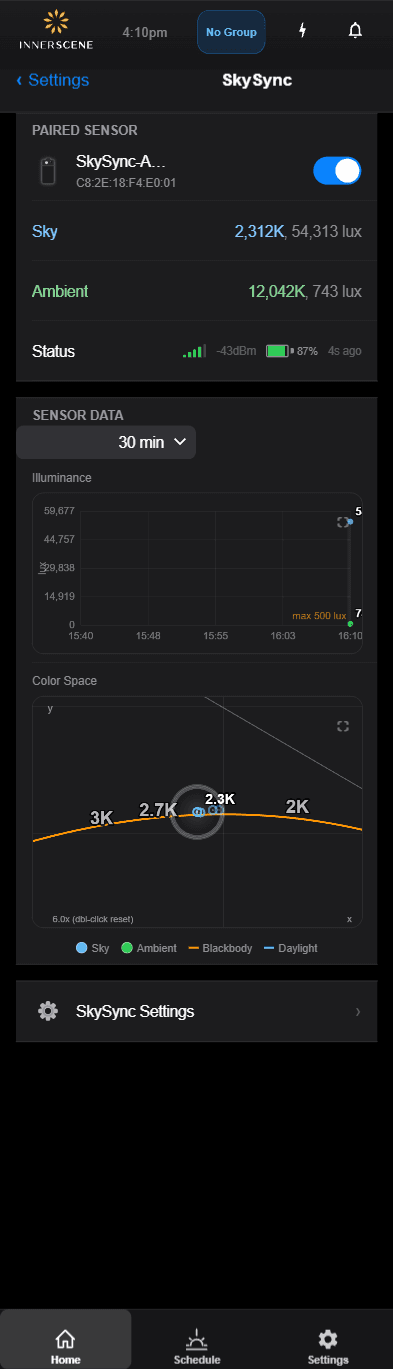
قراءات مباشرة
تابع لون السماء وسطوعها من المستشعر في الوقت الفعلي.
فتح في الدليل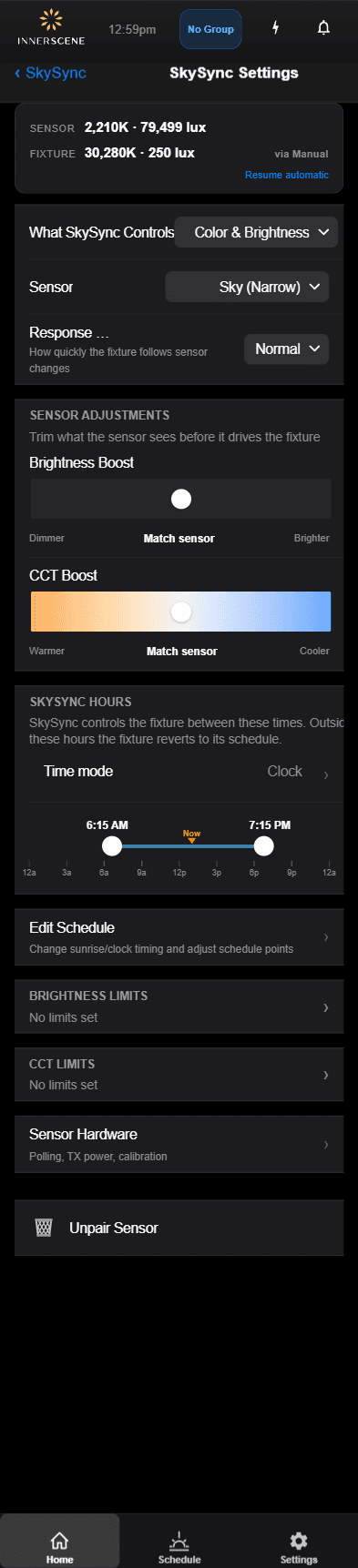
الإعدادات
اضبط كيف يقود المستشعر درجة حرارة اللون والسطوع.
فتح في الدليل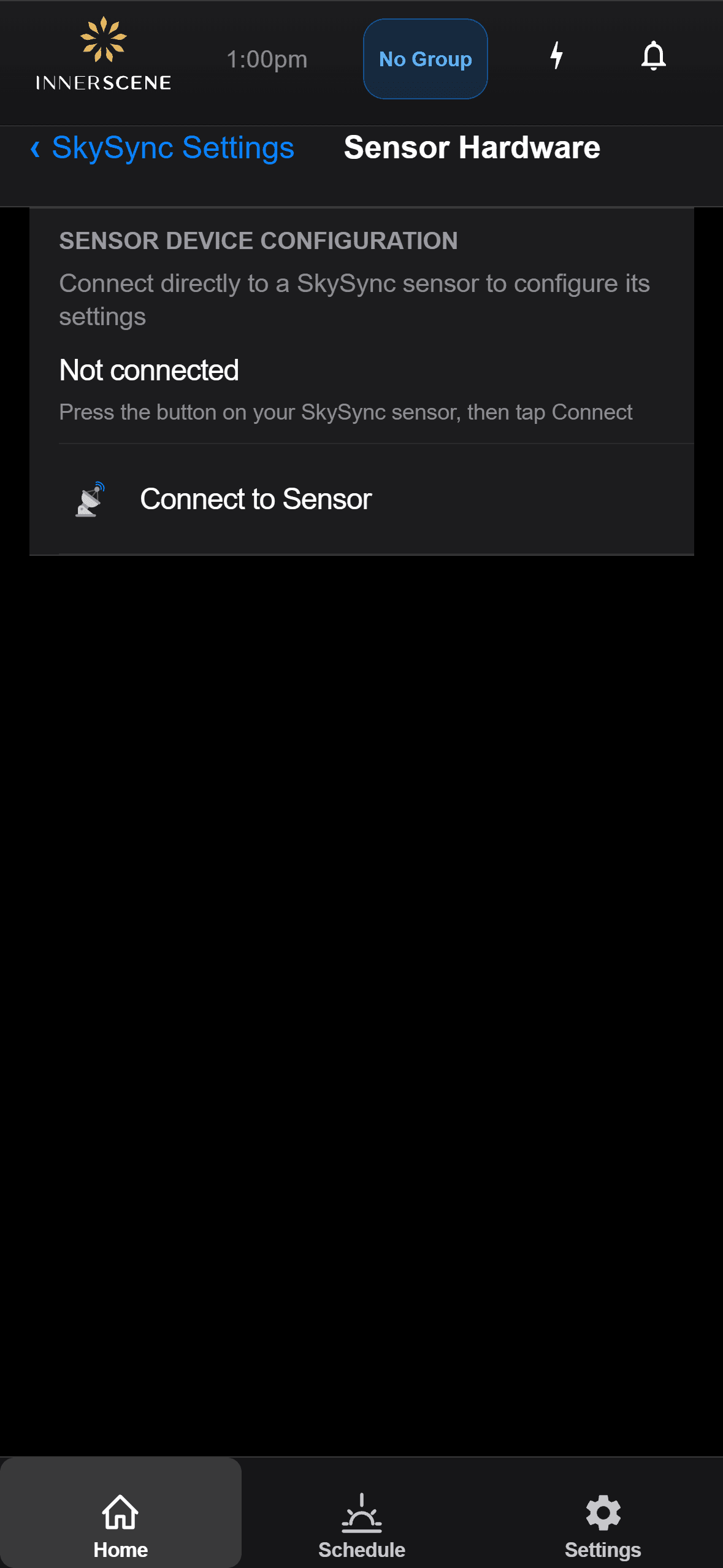
العتاد
تحقق من مستوى البطارية وقوة الإشارة وحالة المستشعر.
فتح في الدليل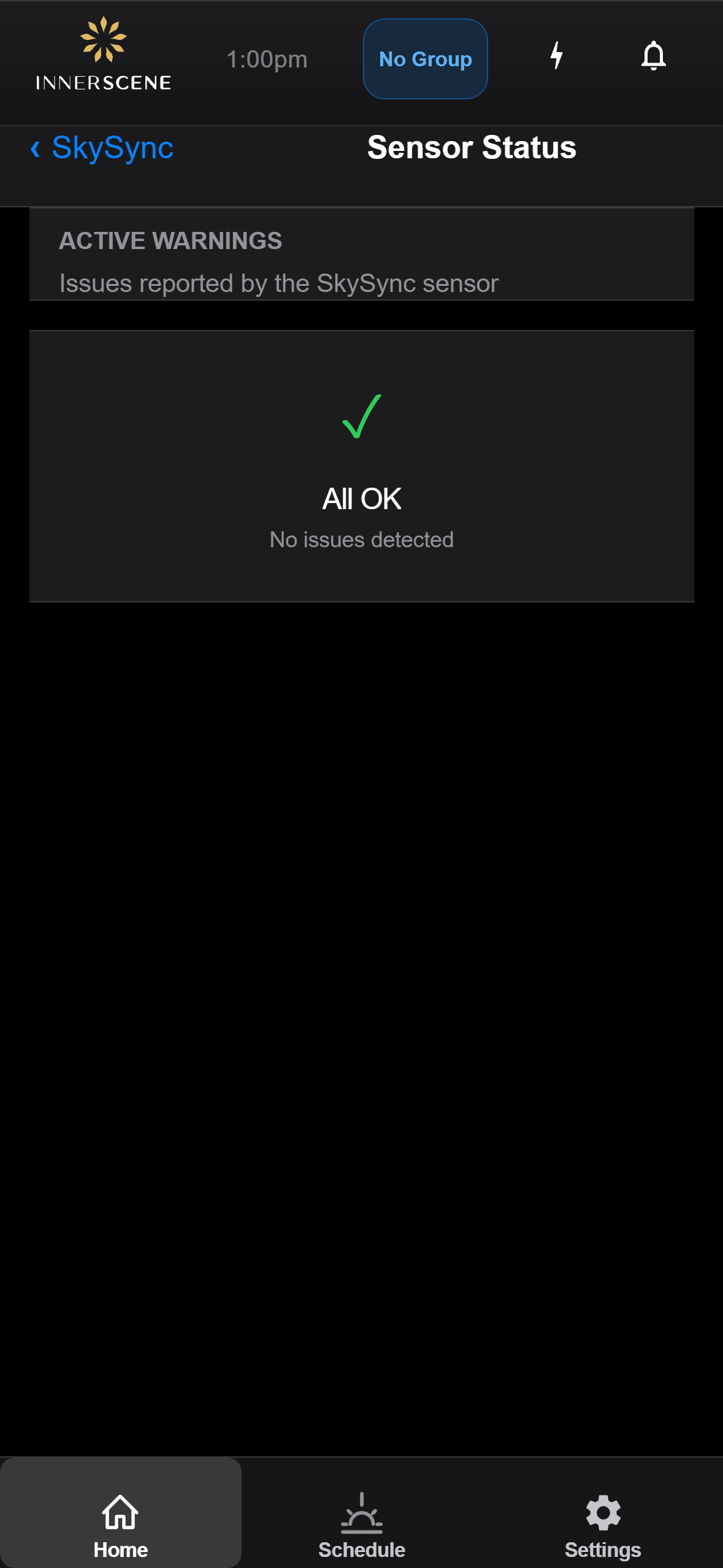
استكشاف الأخطاء
اقرأ رسائل حالة المستشعر وحل المشكلات الشائعة.
فتح في الدليلأسئلة، بإجابات.
كم عدد مستشعرات SkySync التي أحتاجها؟
في معظم الحالات يكفي SkySync واحد، حتى لمبنى كبير. يغذّي مستشعر رئيسي واحد الشبكة، وتُرحّل الوحدات الثانوية، فتستطيع قراءة واحدة الوصول إلى تركيب بأكمله عبر أوضاع الشبكة.
هل يمكن استخدام SkySync في الخارج؟
SkySync مصمم للاستخدام الداخلي فقط. يوفّر التركيب خلف الزجاج قياسًا دقيقًا للون الضوء الذي تراه مساحتك فعلًا، ويحمي المستشعر من الطقس والأشعة فوق البنفسجية، ولا يحتاج إلى تنظيف، ويمنح مدى لاسلكيًا أفضل لوحداتك.
ماذا لو كانت نوافذي معتّمة أو أردت ضوءًا أقل؟
من تطبيق الوحدة أو واجهتها على الويب يمكنك رفع سطوع SkySync لتعويض زجاج معتّم داكن، أو خفضه لغرف الوسائط والاحتياجات الخاصة الأخرى. كما يمكن لتعزيز CCT اختياري أن ينقل النتيجة إلى درجات أدفأ أو أبرد.
ما التشغيل الأولي المطلوب في الموقع؟
للطلبات الجديدة، يُشحن SkySync مقترنًا ومهيّأً مسبقًا، فلا حاجة إلى تشغيل أولي في الموقع. للتركيبات القائمة، يكفي تحديث سريع للبرنامج الثابت، والاقتران عبر التطبيق أو واجهة الويب، وضبط حالة التشغيل على الجدول.
مع أي أنظمة تحكم خارجية يعمل؟
SkySync متوافق مع جميع متغيرات تحكم Circadian Sky، بما في ذلك 0-10V وDMX وDALI وCasambi. يمكن للتحكمات الخارجية تجاوز SkySync، وتعيد ميزة الاستئناف عند الخمول الوحدات إلى الجدول تلقائيًا عندما يكون الإعتام خاملًا أو بعد دورة تشغيل.
ما الأوضاع التي تربط SkySync بالوحدات؟
أربعة: لاسلكي مباشر، ومُرحِّل لاسلكي عبر Mini Hub المرفق، وشبكة محلية عبر UDP، ومُرحِّل سحابي عبر Innerscene Cloud Services، لتغطية كل شيء من غرفة واحدة إلى حرم متعدد المباني.
الوثائق والأدلة.
هذا المنتج محمي ببراءة اختراع واحدة أو أكثر، مع براءات إضافية قيد الطلب. عرض جميع البراءات
مع مرور الغيوم وتحرك الشمس عبر السماء، يتغير ضوؤك ويستجيب، فيجعل المساحات تنبض بالحياة وتتنفس بانسجام مع العالم الخارجي.
أدخِل السماء الحية.
© 2026 Innerscene. جميع الحقوق محفوظة.