Innerscene Mini Hub
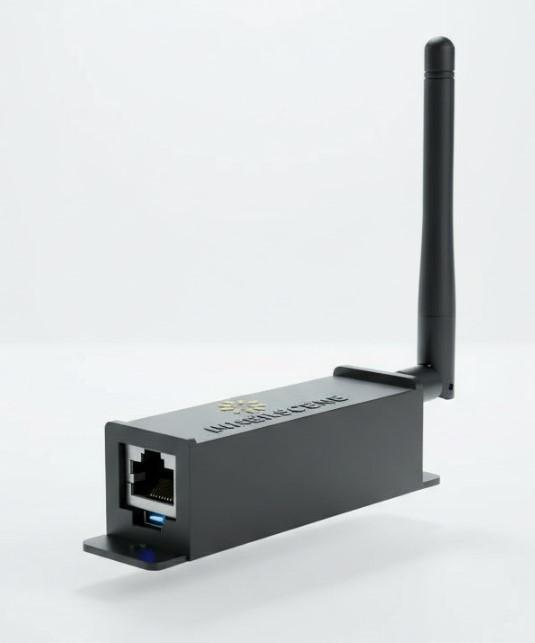
Innerscene Mini Hub is a compact gateway device that extends SkySync's reach to your entire building and beyond.
The Mini Hub receives real-time sky color data from SkySync via Bluetooth Low Energy (BLE) and relays it to Innerscene fixtures (Virtual Sun and Circadian Sky) over your local network (UDP) or through Innerscene Cloud Services (TCP) for remote locations.
With flexible power options including Power over Ethernet (PoE) and USB-C, plus dual network connectivity via WiFi or Ethernet, the Innerscene Mini Hub adapts to any installation scenario — from single-room setups to multi-site enterprise deployments.
Key Features
The Innerscene Mini Hub bridges SkySync sensors with your lighting infrastructure
Local Network Mode
Relay SkySync data to Innerscene devices (Virtual Sun and Circadian Sky) connected to your local network via UDP broadcast.
Cloud Services Mode
Relay SkySync data to Innerscene's Cloud Service (TCP), enabling data transmission to distant fixtures where direct local network access isn't available.
Flexible Power Options
Power the Hub using Power over Ethernet (PoE) for clean single-cable installations, or USB-C for maximum flexibility.
Dual Network Connectivity
Connect to your local network using WiFi (configured via web UI) or Ethernet (DHCP auto-configuration).
System Overview
The Innerscene Mini Hub sits between SkySync and your Innerscene fixtures, bridging wireless sky data to your local network
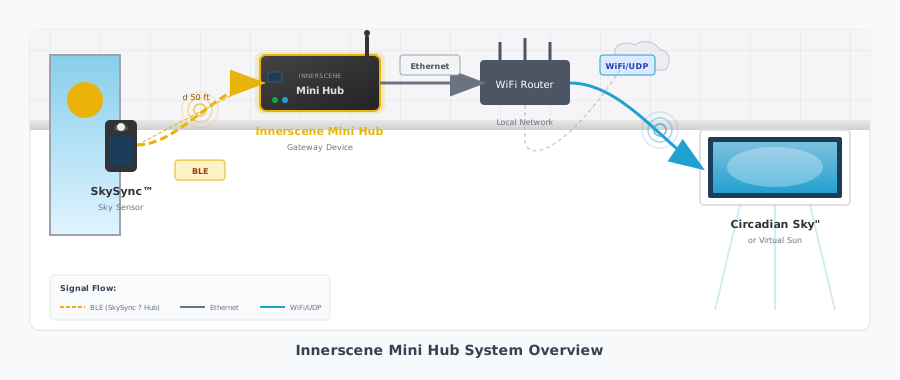
SkySync → Mini Hub
SkySync transmits sky color data via BLE. Place Mini Hub within 50 ft for reliable reception.
Mini Hub → Network
Connect via Ethernet (recommended) or WiFi. The Hub joins your local network automatically via DHCP.
Network → Fixtures
Sky data broadcasts via UDP to all Innerscene fixtures on the network, keeping them in sync.
Scale to Any Size
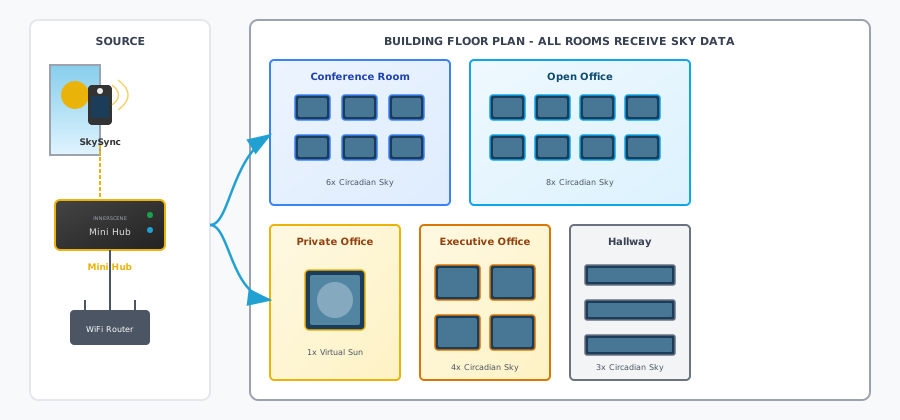
One Innerscene Mini Hub can broadcast sky data to every fixture in your building — from a single room to an entire floor
Multi-Room Deployment with Innerscene Mini Hub
Fixtures Supported
UDP broadcast reaches all fixtures on your network simultaneously — no per-fixture limits
SkySync Required
A single SkySync sensor provides sky data for your entire deployment through the Mini Hub
Synchronization
All fixtures update together, creating a unified circadian lighting experience across your space
Easy Setup
Get the Innerscene Mini Hub up and running in minutes
Connect Power
Power the Hub using either PoE via the Ethernet port, or connect a USB-C power adapter.
Connect to Network
Ethernet (Recommended)
Simply connect an Ethernet cable. The Hub uses DHCP to automatically obtain an IP address.
WiFi
Access the Hub's web UI to enter your local network SSID and password for wireless connectivity.
WiFi Connection Guide →Pair with SkySync
The Hub automatically receives SkySync data via BLE (Bluetooth Low Energy). Place within 50 ft of SkySync for reliable reception.
Configure Mode
Use the web UI to select Local Network mode (UDP) for on-premises fixtures, or Cloud mode (TCP) for remote locations.
Learn how to connect to the WiFi interface →Specifications
| SkySync Reception | BLE (Bluetooth Low Energy), 50 ft range |
| Power Input | PoE (IEEE 802.3af) or USB-C |
| Power Consumption | 0.5W |
| Network - Ethernet | 10/100 Mbps, DHCP auto-configuration |
| Network - WiFi | 2.4 GHz, configured via web UI |
| Local Network Output | UDP broadcast |
| Cloud Connection | TCP to Innerscene Cloud Services (SSL encrypted, outbound only) |
| Compatible Fixtures | Innerscene Virtual Sun, Circadian Sky |
| Operating Temperature | 0°C to 40°C (32°F to 104°F) |
| Mounting | 2 screws (mounts to any surface) |
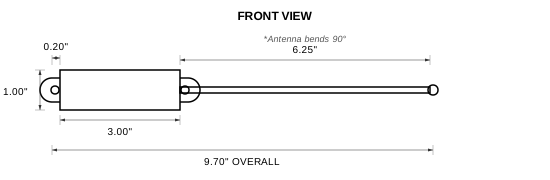
Enclosure Drawing
Frequently Asked Questions
Common questions about the Innerscene Mini Hub
WiFi offers more flexibility in placement but requires initial setup through the web interface and a separate USB-C power source. Note: if your WiFi network name (SSID) or password changes in the future, you'll need to reconnect to the Mini Hub and update these details.
Any standard WiFi router will work. The Mini Hub supports WPA/WPA2-PSK authentication (standard password-based WiFi security). For Local Network mode, your router must allow UDP broadcast, which most consumer and enterprise routers do by default.
Ethernet
Any standard router or switch will work. If using Power over Ethernet (PoE), you'll need a PoE-capable switch or a PoE injector. DHCP must be available for automatic IP assignment — enterprise networks requiring client certificates for DHCP are not supported.
- Power over Ethernet (PoE) — Power and data through a single Ethernet cable. Requires a PoE-enabled switch or injector.
- USB-C — Use any standard USB-C power adapter (5V). A phone charger works perfectly.
The Mini Hub consumes only 0.5W, so power requirements are minimal.
Sky data is broadcast directly to fixtures on your local network. Best for on-premises installations where all fixtures are on the same network. Lower latency, no internet required after setup.
Cloud Mode (TCP)
Sky data is sent to Innerscene Cloud Services, which then relays it to fixtures anywhere in the world. Ideal for remote locations, multiple buildings, or when direct network access isn't possible. Requires internet connectivity; uses SSL-encrypted, outbound-only connections.
In Cloud mode, any number of fixtures registered to your Innerscene Cloud account will receive the data, regardless of their physical location.
Recommendations:
- When a guest network is available, connecting through it is often preferable to avoid corporate firewall restrictions.
- In some cases, corporate IT may need to specifically allow outbound connections to
*.innerscene.com.